

It's Friday night, the dinner rush is in full swing, and suddenly your POS system crashes. In that instant, every bit of your sales data, customer history, and menu configuration could vanish. This is the exact nightmare scenario that a modern cloud backup is designed to prevent.
At its core, cloud backup is an automated service that takes a secure, encrypted snapshot of your business data and stores it in a safe location, far away from your restaurant. With a system like TackOn Table, this isn't an optional extra—it's a core feature that protects your business from day one.
What Cloud Backup Really Means for Your Restaurant
Think of it like having a fireproof, digital vault for all your essential restaurant information. Instead of trusting a single hard drive or a server in the back office—which could easily be damaged by a spill, fall victim to theft, or just fail—cloud backup sends a copy of your data over the internet to a highly secure, professionally managed data center.
The two keywords here are automatic and off-site. You don’t have to remember to do anything; the system just handles it. And your data isn't just saved on-site—it’s stored somewhere completely separate from your physical location. This follows the industry-standard 3-2-1 backup rule: always keep three copies of your data, on two different types of media, with one copy stored off-site.
Why Off-Site Protection is a Game-Changer
Imagine a pipe bursts and floods your office. In that single event, you could lose both your main POS terminal and the local backup drive sitting next to it. A cloud backup, on the other hand, would be completely untouched and ready for you to restore from. That separation is your ultimate safety net against any disaster confined to your building.
Modern, all-in-one restaurant POS systems make this kind of protection completely seamless. For a busy owner, this turns a complicated IT chore into something that just works in the background.
With a system like TackOn Table, cloud backup isn't an afterthought; it's built right in. Every transaction, menu change, and staff update is automatically backed up to the cloud without you ever having to think about it. Our all-in-one simplicity means powerful protection is part of the package.
This integrated approach is what sets modern café management software and restaurant systems apart. Data security is no longer a manual task but a core benefit of the platform. You get peace of mind knowing your operations can bounce back from almost anything, instantly.
The simplicity and affordability of TackOn Table's built-in solutions are designed for businesses of all sizes, from a single food truck to a chain of restaurants. You can learn more about how our platform delivers these powerful, all-in-one restaurant management solutions.
How Your Restaurant Data Is Protected in the Cloud
It's one thing to be told your data is safe, but true peace of mind comes from understanding how it's actually protected. Think of it like a high-security armored truck for your restaurant's information. It’s a process designed to move your critical data from the POS terminal to a secure digital vault, making sure nothing gets lost or stolen along the way.
Now, this digital armored truck doesn't just haul your entire database back and forth every few minutes. That would be incredibly slow and would clog up your internet connection, especially during a busy service. Instead, a system like TackOn Table works much more intelligently, breaking the process down into two smart phases.
The Initial Full Backup
The very first time you set up cloud backup, it performs what's called an Initial Full Backup. This is exactly what it sounds like: a complete, one-to-one copy of every piece of data your restaurant runs on. We're talking every menu item, every modifier, your entire sales history, staff profiles, and customer information. This big, comprehensive snapshot creates the master copy of your operation's data.
Once that foundational backup is safely stored in the cloud, the system switches gears to a much lighter and faster method for day-to-day protection.
Fast and Efficient Incremental Backups
After that first full backup, the system only needs to send Incremental Backups. These are just small, quick updates that contain only what has changed since the last backup.
- A new order is punched into the POS.
- You 86 an item and update the menu.
- A new employee clocks in.
Each of these actions creates a tiny bit of new data. The backup system is smart enough to grab just these little changes and send them securely to the cloud. This process is so fast and uses so little bandwidth that it will never slow down your POS system or get in the way of taking customer orders. It’s the secret to keeping your data protected in real-time without disrupting service.
The most critical step in this entire process is encryption. Before any data—even a tiny incremental update—leaves your restaurant, it's scrambled into an unreadable code. This means that even if someone managed to intercept it, the information would be completely useless without the unique key to unlock it.
If you're interested in the nitty-gritty of how this works, diving into some cloud security fundamentals is a great next step.
Measuring Success: RTO and RPO
When something goes wrong, two simple metrics determine how well you'll recover. For a restaurant, they are everything.
- Recovery Time Objective (RTO): This is all about time. It measures how fast you can get your systems back up and running after a failure. A low RTO means you're back in business in minutes, not hours.
- Recovery Point Objective (RPO): This is all about data. It measures the maximum amount of data you can stand to lose, which is determined by how often you back up.
For any restaurant, the goal for both RTO and RPO is to get as close to zero as possible. You can't afford to be down for a whole dinner service (a bad RTO), and you definitely can't afford to lose an entire afternoon of sales records (a bad RPO).
This is precisely where a modern, integrated system like TackOn Table comes into its own. As an all-in-one platform with mobile POS features and an easy setup, its automatic cloud backups are built to deliver a near-zero RTO and RPO. If a terminal goes down, a server can just grab a tablet, log in, and be right back to taking orders instantly, with all their data exactly where it should be.
The Key Benefits of Cloud Backup for Your Business
For a café, quick-service restaurant, or multi-location franchise, switching to cloud backup isn't just a technical upgrade—it’s a smarter way to do business. Moving your critical data off-site into a secure, automated system delivers real-world advantages that protect your operations and, ultimately, your bottom line. These benefits are especially crucial in the fast-paced restaurant world, where every minute of downtime means lost sales and unhappy customers.
Let's break down the most important ways a modern cloud backup, especially one built into your POS system, can make a difference.
True Disaster Recovery
Think about what would happen if a kitchen fire, a burst pipe, or even a simple theft of your POS terminal occurred. If your only backup is a hard drive sitting in the back office, it’s just as vulnerable as everything else. One local disaster could wipe out both your original data and your only copy, leaving you with no way to recover sales history, customer lists, or menu setups.
This is where cloud backup truly shines. It provides genuine resilience. By keeping an encrypted copy of your data in a secure, remote data center, it’s completely insulated from anything that happens at your location. You can restore your entire operation on new hardware in minutes, not days, turning a potential catastrophe into a manageable hiccup.
The process is simple but incredibly effective, as this diagram shows.
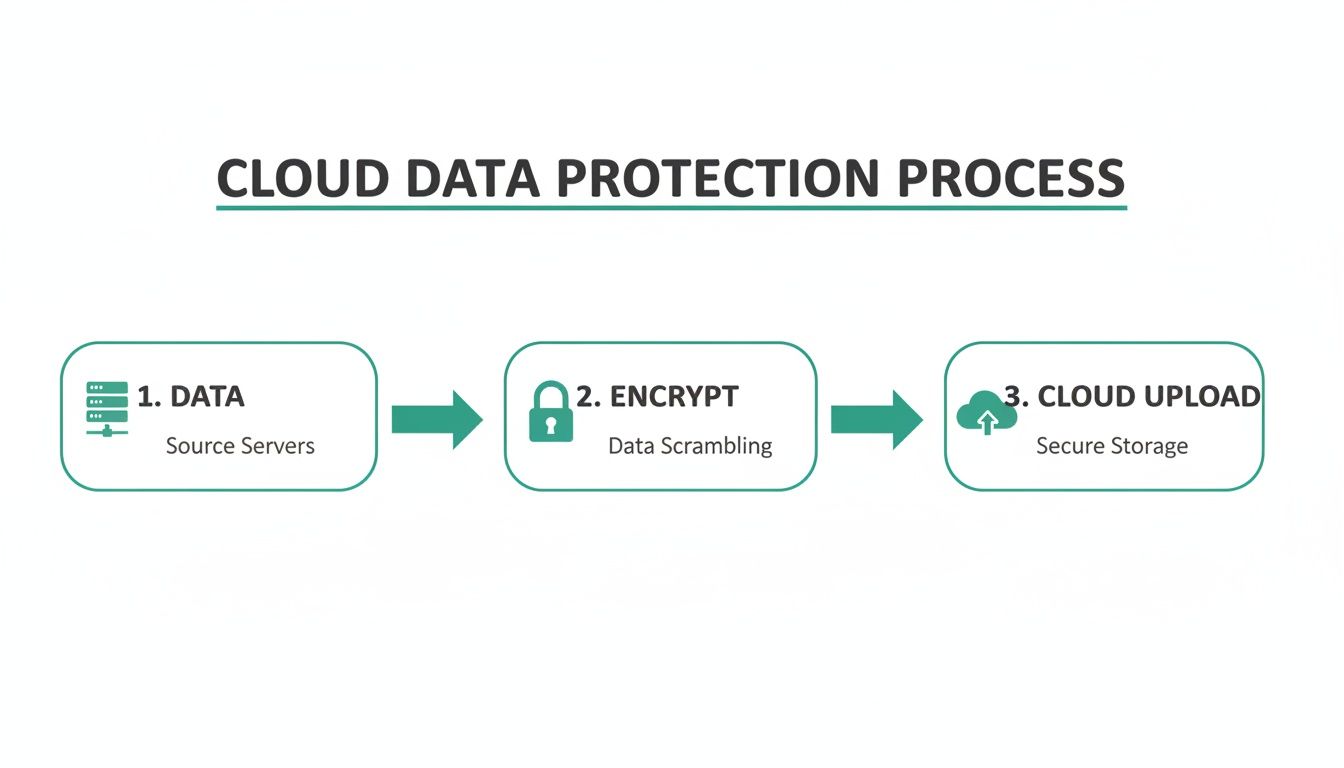
As you can see, your data is first encrypted for security and then safely uploaded to the cloud, creating a secure off-site copy that’s always ready.
Enhanced Security Against Cyber Threats
Ransomware is a nasty and growing threat where criminals lock up your data and demand a hefty payment to release it. For a restaurant, that could mean losing access to your POS system right before the Friday night rush. To make matters worse, traditional local backups are often targeted and encrypted right along with your live systems, making them useless when you need them most.
Cloud backups give you a vital line of defense. Because your data is stored off-site and is often "immutable" (meaning it can't be changed or deleted by an attacker), you have a clean, uninfected version ready for restoration. This lets you sidestep the attacker's demands and get back to serving customers quickly, protecting both your revenue and your reputation.
Major Cost Savings
Setting up and maintaining your own backup server is a serious expense. It involves a big upfront investment in hardware, plus ongoing costs for maintenance, software licenses, and maybe even a dedicated IT person to manage it all. These are costs that most independent restaurants and cafes just can't justify.
Cloud backup gets rid of these capital expenses. With a system like TackOn Table, this powerful protection is simply built into your affordable subscription. There's no extra hardware to buy and no complex software to manage, turning a large, unpredictable cost into a small, predictable operational expense.
This is exactly why so many small and medium-sized businesses have embraced the cloud. It offers top-tier data protection without the massive price tag, making it a perfect fit for food trucks, cafes, and bistros. This trend is a key reason the cloud backup market is projected to grow from USD 5.15 billion in 2024 to USD 22.08 billion by 2033. And with a staggering 95% of businesses suffering from ransomware in 2024, it’s a move that makes more sense than ever. You can dig deeper into these numbers in IMARC Group's detailed cloud backup market report.
Effortless Scalability
As your restaurant grows, so does the amount of data you generate. If you open a second location or add a huge new catering menu, an on-site backup system can quickly run out of space. That forces you into a clunky, expensive cycle of buying new hardware.
Cloud storage, on the other hand, is built to scale with you. It grows as you do, without any drama. Whether you're running a single food truck or a budding franchise with a dozen locations, the cloud offers virtually unlimited capacity. With a platform that includes multi-location control, like TackOn Table, your backup strategy expands right alongside your business, no extra effort required. Our straightforward TackOn Table pricing plans are designed to scale with your needs.
Unmatched Accessibility
Let's be honest—running a restaurant means you're rarely sitting at a desk. You need to access business data whether you're at the farmer's market, at home planning next week's specials, or scouting a new location. On-premise systems lock your data inside the four walls of your restaurant, making remote management a nightmare.
Cloud-based systems set you free. You can securely access sales reports, check inventory levels, and view other critical data from any device with an internet connection. This level of accessibility empowers you to make smart decisions on the fly and manage your business from anywhere, at any time.
For any modern restaurant owner, these benefits make integrated cloud backup not just a nice-to-have feature, but an essential foundation for a secure, efficient, and resilient business.
On-Premises vs. Cloud Backup: What’s the Real Difference?
To really get why cloud backup is such a big deal for restaurants today, it helps to see it side-by-side with the old-school methods. For years, the go-to solution was an external hard drive or a small server humming away in the back office. And while that was fine for its time, it comes with a handful of risks and headaches that simply vanish with a modern cloud system.
When you're picking a backup plan, you're really deciding how you want to protect your business's lifeline. For a broader look at the technology, a good Cloud Computing vs. On-Premise Guide can offer a wider perspective. But for a restaurant owner, the choice really comes down to a few practical things that affect your daily grind and your ability to sleep at night.
So, let's put them head-to-head.
Upfront Cost and Ongoing Headaches
With an on-premises backup, you have to open your wallet wide from day one. You're buying the server or the stack of hard drives, and that’s not cheap. But it doesn't stop there. You have to factor in the ongoing costs of maintenance, the inevitable repairs, and—most importantly—the time you or your manager have to spend babysitting the system. That’s time you’re not spending with your customers or perfecting your menu.
Cloud backup flips this on its head, especially when it's built right into your Restaurant POS like TackOn Table. The big upfront cost disappears, replaced by a predictable, low monthly fee. There is zero hardware to buy and no maintenance to perform. It's all handled for you, making serious data protection a reality for any cafe, food truck, or fine dining spot.
Keeping Your Data Safe and Accessible
Think about that external hard drive sitting in your office. It's vulnerable to so much—a spilled drink, being dropped, theft, or a ransomware attack that locks up your whole network. And if a fire or flood hits your restaurant? Your backup is gone right along with your primary system. It's a single point of failure.
Cloud backups work differently. Your data is zipped away to highly secure, geographically separate data centers. These places have layers upon layers of redundancy. This off-site storage is your best defense against a local disaster. Plus, your data is encrypted before it even leaves your restaurant and stays encrypted while it’s stored, which is a massive step up against cyber threats. It also means you can pull up sales reports or check inventory from your laptop at home—a must for running a restaurant today.
An on-premises backup is only as safe as the room it’s stored in. A cloud backup, integrated into a system with multi-location control, is secured by teams of experts in fortified data centers, offering a level of protection that’s impossible to replicate on-site.
This table really spells out the differences that matter most to a restaurant owner.
On-Premises Backup vs Cloud Backup for Restaurants
When you're busy running a restaurant, the last thing you need to worry about is whether your sales data is safe. This table breaks down the practical differences between keeping your backups in-house versus trusting the cloud.
| Feature | On-Premises Backup (External Hard Drive, Local Server) | Cloud Backup (Integrated with POS like TackOn Table) |
|---|---|---|
| Upfront Cost | High (hardware purchase required) | Low to none (included in subscription) |
| Data Security | Vulnerable to local theft, damage, and ransomware | High (encrypted, off-site, professionally managed) |
| Remote Access | Limited or non-existent | Full access to data and reports from anywhere |
| Maintenance | Manual oversight required (updates, checks) | Fully automated and managed by the provider |
| Scalability | Limited by hardware capacity; requires new purchases | Grows seamlessly with your business |
| Recovery Speed | Slow and manual process; can take hours or days | Fast and often instant; log in on a new device |
At the end of the day, the choice is about reliability and peace of mind. An on-site backup system needs constant attention and always carries that nagging risk. The ‘set it and forget it’ nature of a cloud backup, especially one built into an all-in-one Café Management Software, frees you up to focus on what you actually love to do: creating incredible food and experiences for your guests.
Meeting Security and Compliance Standards Effortlessly
Every time a customer swipes their card, you're not just processing a payment—you're being trusted with their sensitive financial information. That trust is a huge responsibility, and it comes with some very strict rules and serious consequences if things go wrong. Knowing what is cloud backup security is the first step in protecting your restaurant and your diners.
A great cloud backup service does more than just copy your files. It wraps your data in multiple layers of top-tier security. This isn't just a nice-to-have feature; for any business that handles payments, it's an absolute must. Let's break down a few of the key security measures that keep your restaurant's data locked down.
The Cornerstones of Data Security
Real data protection isn't about one single thing; it’s a combination of defenses working together. Think of it like securing your restaurant at night. You have strong locks on the doors, a heavy-duty safe for the cash, and a blaring alarm system. Digital security is no different, with each layer providing its own unique form of protection.
Here are the non-negotiable security features your system needs:
- End-to-End Encryption: This technology essentially scrambles your data into an unreadable code the second it leaves your POS. It stays that way during transit and in storage, making it completely useless to anyone who might try to intercept it without the proper decryption key.
- Secure Data Centers: Reputable cloud providers don't just use any old servers. They store your data in highly fortified facilities with 24/7 physical security, backup power systems, and sophisticated climate control. It’s a level of protection that’s virtually impossible for a single restaurant to replicate on its own.
- Multi-Factor Authentication (MFA): This is a simple but powerful tool. It adds a second step to the login process, like a code sent to your phone, to verify your identity. Even if a thief manages to steal your password, MFA stops them in their tracks.
Together, these measures create a powerful defense against both hackers and physical threats, ensuring your business-critical information stays safe and confidential.
Staying Compliant with PCI DSS
If you accept credit cards, you have to play by the rules. The most important rulebook is the Payment Card Industry Data Security Standard (PCI DSS). It’s a mandatory checklist of security controls created to protect cardholder data from being stolen and used for fraud.
Ignoring PCI DSS can be a disaster. The consequences range from huge fines and losing your ability to process credit cards to completely destroying your restaurant's reputation. The requirements are complex and cover everything from how your network is configured to who has physical access to your equipment.
This is where an all-in-one platform becomes your greatest ally. A fully compliant system like TackOn Table, with its integrated secure cloud backups, is engineered to meet these stringent requirements automatically. You don't need to be a security expert—the platform handles the compliance for you, demonstrating our advantage in simplicity and adaptability.
With cyber threats on the rise, having solid security is non-negotiable. The global cloud backup market, valued at USD 8.64 billion in 2024, is expected to skyrocket to USD 52.47 billion by 2032, fueled by this demand for unbreakable data protection. With over 2,200 global cyber incidents daily and hospitality downtime costing an average of $5,600 per minute, the stakes have never been higher. Cloud solutions directly address this by enabling 40% faster recovery and cutting down on errors—a core benefit built right into TackOn Table's system. You can dig deeper into these trends in this cloud backup market intelligence report.
When you choose a modern Restaurant POS that’s built with security and compliance in mind, you’re not just buying a piece of software. You're investing in peace of mind. It allows you to focus on what you do best—serving great food—knowing that your data, your customers, and your business are protected by default. To see how TackOn Table makes security and compliance simple, you can book a demo with one of our specialists.
Why Your Restaurant POS Needs Integrated Cloud Backup
Let's be honest, data backup is probably the last thing on your mind during a busy dinner rush. For any restaurant owner, that daily to-do list is already a mile long. The critical job of protecting your business data needs to be a seamless, almost invisible part of your POS system—not another chore that gets pushed to the back burner.
Relying on manual backups or standalone software is just asking for trouble.
Think about it: manual processes are a magnet for human error. Someone forgets to run the backup, they use the wrong settings, or the external drive gets misplaced or damaged. Adding separate backup software just creates another subscription to manage and another potential conflict with your POS. The whole point of a modern system is to make your life simpler, not more complicated.
The Power of an All-in-One Solution
An integrated cloud backup completely removes the guesswork and the manual labor. Instead of being another task in your closing procedures, data protection just happens automatically in the background. You never even have to think about it. This is exactly how modern restaurant management should work—shifting from manual effort to automated security.
With a platform like TackOn Table, this isn't an add-on; it's the standard. Every piece of data is protected the moment it’s created:
- Every transaction is securely logged the instant it happens.
- Every menu update is saved and synced across all your devices.
- Every employee clock-in is recorded in real-time.
This built-in approach is non-negotiable when you consider the stakes. The cloud backup market has exploded for a reason: businesses simply can't afford the risk of data loss. With downtime potentially costing $9,000 per minute and organizations facing an average of 2,200 cyber attacks daily, automated efficiency is key. Integrated systems can reduce human errors by up to 95%, offering a level of reliability that manual methods can't even come close to. You can learn more about how the cloud backup market is growing to meet these demands.
We designed TackOn Table to simplify your operations, not add to them. By building automatic cloud backup directly into our Restaurant POS, we take the burden of data protection off your shoulders so you can focus on what you do best: serving great food and taking care of your guests.
A Smarter Alternative to Toast vs Clover
When you're looking at Toast vs Clover alternatives, the simple elegance of an integrated system is a huge factor. You shouldn't need to be an IT expert—or hire one—just to make sure your business is protected.
TackOn Table delivers this powerful security with an easy setup, the flexibility of a mobile POS, and seamless multi-location control. It’s all part of our commitment to making powerful tools both affordable and simple. At the end of the day, it's about the peace of mind that comes from knowing your business's most valuable asset—its data—is always safe.
See just how effortless and secure your operations can be. Start your free trial or book a personalized demo to experience the TackOn Table difference today.
{schema}FAQ about Cloud Backup for Restaurants{/schema}
Let's cut through the noise. When restaurant owners think about moving to the cloud, the same few questions always pop up. Here are some straight-up answers to help you see how modern systems keep your business safe and running, no matter what.
{schema}Is My Financial and Customer Data Safe in the Cloud?{/schema}
{schema}Yes, it’s incredibly safe. Reputable systems like TackOn Table use what’s known as bank-level encryption. Think of it this way: it's the same security technology your bank uses to protect every single online transaction.
Your data isn't just sitting on some random server; it's housed in professional data centers that have to meet tough compliance standards, like PCI DSS for handling credit card information. Frankly, this is worlds more secure than a server humming away in your back office, which could be stolen, damaged in a flood, or simply fail.{/schema}
{schema}Will Cloud Backups Slow Down My Internet During Service?{/schema}
{schema}Not at all. This is a common myth, but modern Restaurant POS systems are way smarter than that. They use a technique called "incremental" backup.
Instead of trying to upload your entire database every few minutes, the system only sends the tiny bits of data that have changed. Did a server just punch in a new order? Did you update the price of a menu item? Only that tiny new piece of information gets sent. These transfers are small, fast, and often scheduled for quiet times, so they have zero impact on your service speed, even during the Saturday night rush.{/schema}
A well-designed system makes backups happen in the background without you ever noticing. You get constant protection without slowing down the service your staff needs to provide.
{schema}What Happens If My Internet Connection Fails?{/schema}
{schema}Any cloud POS worth its salt is built for the real world, and in the real world, internet connections sometimes drop. Systems like TackOn Table come with a powerful offline mode.
This means your staff can keep taking orders and even processing payments without a hitch. The moment your internet comes back online, the system automatically syncs everything that happened during the outage. Nothing is ever lost, and your operations never stop.{/schema}
{schema}How Fast Can I Recover My Data After a System Failure?{/schema}
{schema}The recovery is almost instant—we're talking minutes, not hours or days. With a true cloud system, your business isn't tied to one specific machine.
If a POS terminal gets dropped or a tablet dies, you just grab another one, log in, and you're right back where you left off. Your entire menu, all your sales history, and every setting are immediately available. What could have been a disaster that shuts you down for the night becomes a minor hiccup. For more answers, feel free to check out our complete TackOn Table FAQs page.{/schema}
With TackOn Table, secure, automatic cloud backup is part of the package, not an extra you have to worry about. It’s peace of mind built right in, so you can focus on what you do best: taking care of your guests. Ready to see the difference an all-in-one, simple, and affordable POS can make?
Book a Demo