

Running payroll in a restaurant isn't just about cutting checks. It’s a multi-step process that starts with classifying workers correctly, setting a regular pay schedule, and meticulously tracking every hour worked. From there, you have to calculate gross pay—factoring in tips and overtime—withhold the right amount of taxes, and finally, get payments out on time.
The secret to keeping this all straight? An integrated system that connects your time tracking directly to your payroll software. This connection is what saves you from manual data entry nightmares and keeps you compliant. TackOn Table’s all-in-one simplicity ensures your time tracking, sales, and payroll data are always in sync, making payday a smooth, automated process.
Mastering the Essentials of Restaurant Payroll

Let's be honest: payroll in a restaurant is a different beast entirely compared to an office job. You're constantly juggling fluctuating hours, complicated tip calculations, and a web of labor laws that can give any operator a headache. This guide is your roadmap to confidently navigating the entire payroll process, whether you run a busy diner, a quiet café, or a food truck on the go.
Nailing the fundamentals is the only way to achieve a stress-free payday. That means you need to understand the legal differences between your workers and pick a payment schedule that works for your cash flow. Most importantly, you need a system built to handle the unique rhythm of restaurant work—one that’s simple to set up and adaptable to your needs.
Classify Your Team Correctly
Your first, and arguably most important, decision is how to classify everyone on your team. Are they W-2 employees or 1099 independent contractors? This isn't a casual choice—the IRS has very clear rules, and getting it wrong can bring on some serious penalties.
-
W-2 Employees: This is the classification for the vast majority of your staff. Think servers, line cooks, hosts, and bartenders. If you dictate their schedule, provide their tools (uniforms, aprons, etc.), and direct how they do their job, they are employees. For W-2 staff, you’re on the hook for withholding income, Social Security, and Medicare taxes.
-
1099 Independent Contractors: This is a much rarer classification in the day-to-day operations of a restaurant. It’s for folks like a freelance social media manager, the musician who plays on Friday nights, or a third-party delivery service. The key difference is your lack of control over how they complete their work.
Getting this right from day one is non-negotiable. Misclassifying an employee as a contractor means you fail to pay your share of payroll taxes, which can result in back taxes, fines, and legal trouble.
To make it easier, here’s a quick breakdown of the key differences.
Employee Classification At a Glance
Use this quick comparison to determine if your team members are W-2 employees or 1099 independent contractors.
| Factor | W-2 Employee | 1099 Contractor |
|---|---|---|
| Control | Employer directs how, when, and where work is done. | Worker controls how and when they complete the job. |
| Tools & Equipment | Employer provides necessary tools and equipment. | Worker uses their own tools and equipment. |
| Payment | Paid a regular wage or salary on a set schedule. | Paid by the project or on an invoice basis. |
| Benefits | Typically eligible for benefits like health insurance, PTO. | Not eligible for employer-provided benefits. |
| Taxes | Employer withholds income and payroll taxes (FICA). | Responsible for paying their own self-employment taxes. |
Always consult with a legal or tax professional if you're unsure, but this table gives you a solid starting point for making the right call.
Choose a Consistent Pay Schedule
Once you know who you're paying, you need to decide how often. Your pay schedule needs to be consistent and must follow your state's specific wage and hour laws.
Most restaurants choose one of these common schedules:
- Weekly: Paying every week is often preferred by hourly staff, giving them faster access to their earnings.
- Bi-weekly: This is the most popular option for a reason. Paying every other week (26 pay periods a year) strikes a good balance between keeping employees happy and minimizing your administrative work.
- Semi-monthly: Paying twice a month, often on the 15th and the last day of the month, results in 24 pay periods a year.
Running payroll accurately is critical, as even small mistakes can disrupt your entire operation. According to ADP's 2025 Global Payroll Survey, a staggering six in 10 payroll professionals said staff shortages hurt their ability to do their jobs properly. For operators using TackOn Table, integrating payroll with real-time labor data helps sidestep these errors, leading to more precise scheduling and flawless payouts. You can read the full survey about global payroll trends to learn more.
An all-in-one platform like TackOn Table is built to make this whole process simpler. Its easy setup and intuitive mobile POS let you track hours, manage tips, and run payroll without the usual headaches. This kind of simplicity is a major advantage over clunky Toast vs Clover alternatives, saving you valuable time and protecting you from costly mistakes.
Figuring Out Gross Pay: Wages, Overtime, and Tips
Alright, you’ve classified your team and picked a pay schedule. Now comes the real meat and potatoes of payroll: calculating what everyone earned. This is where precision becomes non-negotiable.
Gross pay—the total amount an employee makes before any deductions—isn’t always a simple hourly rate times hours worked. In a restaurant, you're juggling regular wages, complicated overtime rules, and the ever-present flow of tips.
This is exactly where many operators slip up. A small math error can easily lead to an underpaid cook or server, which can spiral into wage disputes or even legal trouble down the road. Your best defense is a solid Restaurant POS that does the heavy lifting for you. An all-in-one system like TackOn Table pulls data directly from time tracking and sales, automating these crucial calculations and cutting out the guesswork.
Nailing Hourly Wages and Overtime
Calculating standard pay is pretty straightforward: Hours Worked x Hourly Rate = Gross Wages. But what about when your best line cook pulls a 50-hour week to cover for someone who called out sick? That's when federal overtime laws, specifically the Fair Labor Standards Act (FLSA), kick in.
The FLSA is clear: non-exempt employees must be paid at least 1.5 times their regular rate for any hours worked over 40 in a single workweek. Let's break it down for that line cook who makes $18 an hour.
- Regular Pay: 40 hours x $18/hour = $720
- Overtime Rate: $18/hour x 1.5 = $27/hour
- Overtime Pay: 10 hours x $27/hour = $270
- Total Gross Pay: $720 + $270 = $990
It’s easy to forget why these rules exist. The FLSA was passed back in 1938 to establish the 40-hour workweek and discourage employers from overworking their staff. Failing to pay that overtime premium isn't just cutting corners—it’s breaking the law.
And don't forget, state laws can add another wrinkle. Some states require overtime for working more than eight hours in a single day, regardless of the weekly total. This is why having multi-location control is a lifesaver for restaurant groups. A system like TackOn Table lets you customize rules for each location, keeping you compliant everywhere you operate.
Untangling the Complexity of Tips
For most of your front-of-house staff, tips are everything. But for you, they add a serious layer of complexity to payroll. You need a bulletproof system for tracking and paying out every dollar, whether it's cash or credit.
- Cash Tips: These go straight into your employees' pockets. While you don't physically handle them, you're still on the hook for making sure your staff reports them for tax purposes.
- Credit/Debit Card Tips: Your restaurant collects these first, so you're responsible for paying them out on employee paychecks. Most modern POS systems are built to track these automatically.
An integrated system like TackOn Table makes this so much easier. When a guest leaves a tip on a credit card through a mobile POS, the data is instantly logged and assigned to the right server. This completely removes the need for manual spreadsheets and the errors that come with them. For places like quick-service restaurants that are processing tons of transactions, this automation is a must-have.
Tip Credits and Pooling, Explained
In many states, you can pay tipped employees a lower direct wage—the federal minimum is $2.13 per hour—by taking a tip credit. This is only legal if the employee’s tips, combined with their hourly wage, meet or exceed the standard minimum wage. If they come up short, you, the employer, have to make up the difference.
Another popular setup is tip pooling or tip sharing. This is where all tips are gathered and then distributed among a wider group of staff, which might include servers, bussers, hosts, and sometimes even back-of-house employees like cooks and dishwashers.
Whatever your policy, it has to be crystal clear and applied consistently. As a leading Toast vs Clover alternative, TackOn Table gives you the flexibility to manage different tip-out models, whether you distribute based on hours worked or fixed percentages. It brings a level of fairness and transparency that builds trust with your team. This all-in-one simplicity is also what makes it a smarter, more affordable choice for modern Café Management Software.
Getting Payroll Taxes and Deductions Right as a Restaurant Owner
Okay, you've figured out everyone's gross pay. Now comes the part that makes a lot of restaurant owners nervous: taxes. It can feel like a maze, but think of it as a logical, step-by-step process. Your job is to withhold the right amount from each paycheck and send that money—along with your own employer contributions—to the right government agencies.
Let’s be clear: getting this wrong isn't a small clerical error. It can trigger some pretty serious IRS penalties and audits. This is exactly where having an integrated Café Management Software like TackOn Table can be a lifesaver. It takes these tangled calculations off your plate, which means less risk and more accuracy every single payday.
Federal Payroll Taxes: The Big Picture
The biggest slice of the payroll tax pie is federal. This includes the income tax you withhold for your employees, FICA taxes that fund Social Security and Medicare, and the federal unemployment tax you pay as the employer.
-
Federal Income Tax Withholding: How much you withhold is based on the Form W-4 each employee filled out when they started. Their filing status, number of dependents, and any extra withholding requests all play a part.
-
FICA Taxes (Social Security & Medicare): This one is a team effort. You’ll withhold 6.2% for Social Security (on wages up to the annual limit) and 1.45% for Medicare from your employee's check. Then, you have to match that contribution, kicking in another 7.65% for each employee from the business.
-
FUTA Tax (Federal Unemployment): This tax is all on you, the employer. The official rate is 6.0% on the first $7,000 each employee earns. But don't panic—most restaurants get a big tax credit that brings this rate way down, as long as you're paying your state unemployment taxes on time.
I like to think of it like prepping a complex recipe. Each tax is a key ingredient, and the amounts have to be precise. If you mess up one measurement, the whole dish is ruined. A good payroll system acts as your recipe, ensuring every calculation is perfect.
Don't Forget State and Local Taxes
Once you have federal taxes down, you’ve got to tackle state and sometimes local taxes. This is where it gets tricky, because the rules can be wildly different from one place to the next.
Imagine you run a food truck that operates in three different counties, or you're a small restaurant group opening a new location in the next state over. You’re suddenly dealing with a messy web of different tax laws. This is where a feature like TackOn Table’s multi-location control really shines. You can manage custom tax rules for every single location, all from one central dashboard. It turns a compliance nightmare into a manageable task.
Keep an eye out for these common taxes:
- State Income Tax: Most states have one, and they all have their own withholding tables and rules.
- SUTA Tax (State Unemployment): Just like FUTA, this is an employer-paid tax that funds your state's unemployment benefits program.
- Local Taxes: Some cities or counties tack on their own income or payroll taxes that you'll be responsible for.
Handling Pre-Tax and Post-Tax Deductions
Taxes aren't the only thing that gets taken out of a paycheck. You'll also be managing deductions for benefits, retirement plans, and other items. They generally fall into two buckets.
Pre-Tax Deductions are subtracted from an employee's gross pay before any income taxes are calculated. This is a great benefit for your team, as it lowers their taxable income and saves them money. Common examples are:
- Premiums for health, dental, and vision insurance
- 401(k) contributions
- Health Savings Account (HSA) deposits
Post-Tax Deductions are taken out after all the taxes have been figured out. These don't affect an employee's taxable income. You'll see these for:
- Roth 401(k) contributions
- Wage garnishments (for things like child support)
- Charitable giving through payroll
The key takeaway here is that handling deductions accurately is every bit as critical as getting the taxes right. A simple mistake in a pre-tax deduction can mess up an employee's total tax withholding for that pay period.
This level of detail is where spreadsheets and manual payroll just can't keep up. As a leading Toast vs Clover alternative, TackOn Table brings everything together in one system that handles all these moving parts without missing a beat. It's built to be affordable and simple enough for a single food truck but powerful enough for a growing franchise. No more juggling different programs—just one place to manage it all.
Ready to take the guesswork out of your payroll taxes and deductions?
Start Your Free Trial of TackOn Table
Finalizing Payroll: Payments, Records, and Tax Reporting
Alright, you’ve tracked the hours, calculated the wages, and wrestled with the tips and overtime. Now comes the moment of truth: actually paying your people. This is where your reputation as a reliable boss is really made or broken. Getting this part right isn't just about clicking "send" on a payment; it's about building a rock-solid process for payments, records, and taxes that keeps your restaurant humming along without any legal headaches.
If you're running more than one location, this final stage can turn into a real beast. Different cities, counties, and states all have their own little quirks when it comes to labor laws and taxes. Suddenly, payroll becomes a tangled mess. This is exactly why having a system with serious multi-location control is a non-negotiable—it lets you manage the whole operation from a single, clean dashboard.
Getting Payments Out and Pay Stubs Delivered
When it comes to paying your staff, you've got two main options: direct deposit or good old-fashioned paper checks. Most people these days prefer direct deposit. It’s fast, secure, and sends money right into their bank account. For you, it cuts down on administrative hassle and you don't have to worry about checks getting lost or stolen.
No matter which method you choose, you absolutely must provide a pay stub (or wage statement) with every single payment. This document is crucial because it gives your employees a transparent breakdown of their earnings and all the deductions for that pay period.
A proper pay stub needs to clearly show:
- Gross wages earned
- Federal, state, and local income taxes withheld
- FICA deductions (that’s Social Security and Medicare)
- Any deductions for benefits, both pre-tax and post-tax
- The final, take-home net pay
This isn’t just a nice-to-have; it's a legal requirement. It protects both you and your team from any confusion or disputes down the road. Using a modern Restaurant POS that integrates with payroll, like TackOn Table, handles this automatically. It generates compliant pay stubs, saving you the headache and ensuring you're always by the book.
Juggling Payroll Across Multiple Locations
Let's be honest: running payroll for one restaurant is tough enough. But once you expand to a second, third, or even tenth location—especially if you cross state lines—the complexity goes through the roof. Each jurisdiction has its own rules for minimum wage, overtime calculations, and tax withholding. It's a huge operational hurdle.
This is a major growing pain for ambitious restaurant groups. A 2025 survey from ADP found that for multi-location businesses, 48% report their processing times have doubled just from trying to navigate different local laws. It’s a clear sign that a patchwork system just won’t cut it as you scale.
A system built for this reality, like TackOn Table, is designed to tackle this head-on. Its multi-location features let you configure specific payroll rules for each restaurant, all while you manage everything from a central command center. This kind of flexibility makes it a powerful Toast vs Clover alternative for operators who are serious about growth. It's particularly useful for full-service restaurants with complex staffing needs.
Nailing Your Tax Filings and Reports
Once your team is paid, you're not done yet. Now you have to act as the government's tax collector. You’re responsible for sending all those withheld taxes to the right agencies and filing regular reports. Miss a deadline, and you can expect some pretty nasty penalties.
This visual gives a good overview of the main payroll taxes you'll be handling: FICA, unemployment, and income taxes.
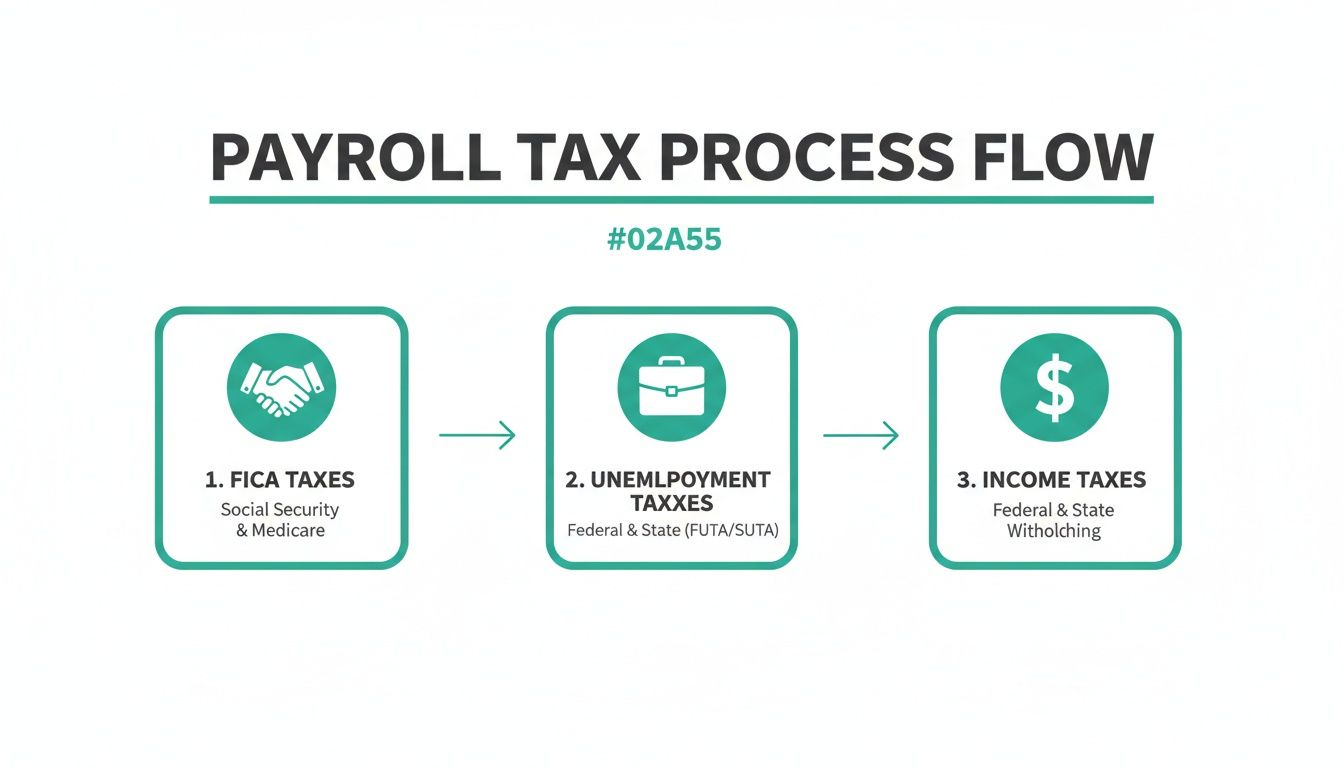
As you can see, it’s a shared responsibility. You withhold taxes from your employees' pay, and you also contribute your own share as the employer.
Get ready to become very familiar with these key forms:
- Form 941 (Employer’s Quarterly Federal Tax Return): This is your big one. Four times a year, you'll use it to report the income taxes, Social Security, and Medicare taxes you withheld, plus your employer match.
- Form 940 (Employer’s Annual Federal Unemployment (FUTA) Tax Return): This one is for reporting and paying your federal unemployment tax. It’s usually filed just once a year.
- Forms W-2 and W-3: At year-end, you have to provide a Form W-2 to every employee, detailing their total annual pay and withholdings. You'll then file a summary of all those W-2s, called Form W-3, with the Social Security Administration.
My biggest piece of advice? Keep meticulous records. Your best defense in any audit is a clean paper trail. You need to hold onto all your payroll records, timecards, and tax filings for at least four years. A cloud-based system like TackOn Table is a lifesaver here, as it securely stores all this data for you, ready to access anytime.
This is where you really see the value of an all-in-one system. Instead of juggling spreadsheets, calendar reminders, and stacks of paper, a platform like TackOn Table automates these filings and keeps your records perfectly organized. It removes the guesswork and gives you back your peace of mind. For any restaurant, café, or food truck owner, that simplicity is invaluable.
Choosing the Right Restaurant Payroll Software
The tech you run your restaurant with can either be your biggest headache or your most powerful asset. When you’re figuring out how to do payroll, the right software turns a tedious, error-prone chore into a smooth, almost automatic process. That frees you up to focus on what actually grows your business—your food, your team, and your guests.
You've really got three paths you can take. You can stick with manual methods, hire an outside payroll company, or go for an all-in-one platform where payroll is just one piece of a bigger operational puzzle. Each has its place, but for the chaotic reality of restaurants, cafes, and food trucks, one of these options has a massive advantage.
Comparing Your Payroll Options: Manual vs. Dedicated vs. All-in-One
Let's dig into the common approaches and see which one really fits the fast-paced world of food service. Getting a handle on the pros and cons is the first step toward making a smarter choice for your business.
To make this easier, here's a quick breakdown of how these solutions stack up against each other.
Payroll Solutions Comparison for Restaurants
| Solution Type | Best For | Pros | Cons |
|---|---|---|---|
| Manual Payroll (Spreadsheets) | Tiny operations with one or two employees and an owner who loves meticulous detail. | It's technically free, giving you full control over every single calculation and entry. | Incredibly time-consuming and dangerously prone to human error. A single typo can wreck paychecks and tax filings, creating huge legal and financial risks. |
| Dedicated Payroll Services | Businesses that need deep HR features and are willing to manage data transfer between different systems. | These companies are experts in tax compliance and can handle complex situations like multi-state payroll and benefits administration. | They are a totally separate system. You'll waste hours manually exporting timecard data from your POS to their platform, creating a major bottleneck and another chance for errors. |
| Integrated Restaurant POS with Payroll | Restaurants, cafes, and food trucks of any size looking for maximum efficiency and accuracy. | This creates a single source of truth. Time tracking, sales data, tips, and payroll all live in one system, killing manual data entry and drastically cutting down on errors. | You’ll have to adopt a new POS system if you're already locked into a contract with another provider. |
As you can see, the choice you make has a direct impact on your time, your accuracy, and ultimately, your sanity.
The core problem with separate systems is the data gap. Every time you have to export a timesheet from your POS and upload it to your payroll provider, you introduce a risk. An all-in-one platform closes that gap permanently.
Why an All-In-One System Is the Smarter Choice
For a restaurant, efficiency isn't a "nice-to-have"—it's a survival tool. An integrated platform like TackOn Table is built around this reality. Instead of trying to patch different software together, you get a single system where every part talks to every other part. When your server clocks in on the mobile POS, that data is instantly available for payroll. No exporting, no importing, no fuss.
This native integration is what makes TackOn Table such a strong Toast vs Clover alternative. While those platforms might offer payroll, it's often through clunky third-party apps. TackOn Table was built with all-in-one simplicity and affordability at its core, giving you a powerful, cohesive system without the ridiculous price tag.
You can get our entire system up and running in under 30 minutes. That isn’t a sales pitch—it’s a promise to get you back to running your business faster. Curious how much you could save by switching? Check out our handy restaurant savings calculator.
Making the Final Decision
Choosing your payroll software is a huge business decision that impacts more than just payday. Think about your future. A spreadsheet that kind of works for two employees will absolutely fall apart when you hire your tenth. A dedicated provider might seem solid, but that weekly time suck of transferring data will only get worse as you get busier.
An integrated Café Management Software like TackOn Table is designed to grow with you. Its multi-location control means you can manage payroll for one food truck or a dozen cafes from the same dashboard. This flexibility, combined with a simple interface and honest pricing, gives ambitious restaurant owners a clear path forward. This is about more than just doing payroll; it's about building a more efficient, profitable, and less stressful business.
FAQs on How to Do Payroll for a Restaurant
What if a tipped employee doesn't earn enough to meet minimum wage?
This is a big one, and getting it wrong is a serious compliance risk. If an employee's hourly wage plus their tips doesn't equal the full federal, state, or local minimum wage for that pay period, you're on the hook for the difference. It’s called a tip credit shortfall payment, and it's non-negotiable.
This is where a modern Restaurant POS like TackOn Table becomes invaluable. It tracks tips in real time against hours worked, so it can flag an employee who's trending below the minimum wage threshold. That heads-up gives you a chance to fix the issue before payroll is even finalized.
I messed up a paycheck. What's the best way to fix it?
It happens to the best of us. The most important thing is to act fast and be transparent. If you underpaid someone, the right move is to cut them a separate, off-cycle check for the missing amount immediately. Don't make them wait for the next regular payroll run.
Overpayments are a bit trickier. You’ll need to work directly with the employee on a repayment plan. State laws are very specific about how you can recoup these funds—you can't just claw the full amount back from their next paycheck without getting their written permission first.
The surest way to handle payroll errors is to avoid them entirely. An integrated system gets rid of the manual data entry that’s behind 90% of these mistakes, ensuring everything is right from the start.
Can I pay my restaurant staff as 1099 contractors to save money?
This is probably the most dangerous—and tempting—payroll myth out there. You don’t get to simply choose to classify your servers, line cooks, or bartenders as 1099 independent contractors to dodge payroll taxes. The IRS has strict rules based on who has behavioral and financial control.
Think about it this way:
- Do you set their work schedule? They’re an employee.
- Do you provide the equipment and train them on your methods? They’re an employee.
- Are they essential to the day-to-day function of your restaurant? They’re an employee.
Getting this wrong can bury you in back taxes, fines, and penalties. It's a gamble that just isn't worth the risk. TackOn Table's employee management system is built for W-2 staff, keeping you compliant from day one.
Do I owe overtime to my salaried restaurant managers?
Not necessarily, but this is a major gray area for restaurants. Just paying someone a salary and giving them a "manager" title doesn't automatically make them exempt from overtime. They have to meet specific "duties tests" and earn more than a salary threshold set by the Department of Labor.
For example, a "manager" who spends most of their shift bussing tables, running food, or working the line alongside hourly staff likely won't qualify as exempt. You’d still owe them overtime for any hours worked over 40. As a top Toast vs Clover alternative, TackOn Table's detailed labor reports help you monitor hours for everyone—salaried or not—giving you the data you need to make the right call. It’s this kind of built-in flexibility that makes it such a smart piece of Café Management Software.
Payroll doesn't need to be the headache it's often made out to be. When you have the right systems and a clear process, it can be accurate, compliant, and surprisingly efficient. TackOn Table pulls all the pieces together—from time clocks on a mobile POS to tax filings—into one straightforward, affordable platform.
Ready to see what an all-in-one system can do for your restaurant? Book a Demo.