

The best POS system for a small restaurant is the one that becomes the central nervous system for your entire operation. It should bring your orders, payments, inventory, and management together into one place that just works. For most small restaurants, that means finding a system like TackOn Table—affordable, simple, and adaptable enough to keep up as you grow.
Why Your Restaurant POS Is the Heart of Your Small Restaurant
Picking the right Restaurant POS is one of the most important decisions you'll make as a small restaurant owner. Think of it less like a digital cash register and more like the operational hub that connects your dining room, your kitchen, and your back office. It's what lets you run a tighter ship, from taking orders and processing payments to tracking inventory and building a base of loyal customers.
Investing in a good POS isn't optional anymore; it's a must for staying profitable and competitive. This guide will get into the nitty-gritty of what really makes a system the "best," looking past the flashy features to focus on what actually impacts your day-to-day and your bottom line.
Understanding the Modern Café Management Software
A truly capable restaurant POS does a lot more than just ring up sales. It should be your command center, giving you a clear, real-time picture of your business at any given moment. This means pulling together different functions to make your workflow smooth and efficient.
Think about what a connected system really does for you:
- A More Efficient Floor: Servers can fire orders straight from a mobile POS tablet at the table to the kitchen printer, which means fewer mistakes and faster ticket times.
- A Better Guest Experience: Nothing says "good service" like an accurate order and a quick, secure payment process. It leaves a great final impression.
- Smarter Business Decisions: When you can see real-time sales data, you can spot your best-selling dishes, optimize staff schedules, and get a handle on food costs.
- Room to Grow: The right system will grow with you. When you're ready to add online ordering or even open a second location, your POS should be ready to handle it with easy multi-location control.
The market for restaurant POS terminals is exploding for a reason. Valued at USD 25.1 billion in 2025, it’s expected to nearly double to USD 49.3 billion by 2035. This massive growth shows just how critical these systems have become for small restaurants. Traditional fixed terminals are still expected to hold a 61.30% market share in 2025, largely because of their unmatched reliability in busy full-service restaurants. You can find more insights on the growing POS market.
TackOn Table as Your Restaurant's Command Center
For a small restaurant with big plans, an all-in-one solution like TackOn Table is built to handle these exact challenges. It’s a powerful platform that doesn't force you to choose between affordability and capability. Instead of trying to patch together different software for different tasks, TackOn Table puts everything you need into one clean interface. It's the perfect fit for owners who need a system that's simple to use but doesn't skimp on power, featuring an easy setup and remarkable adaptability.
It's time to find a POS that works as hard as you do.
Ready to see what a modern POS can do for your restaurant? Book a demo today and see the TackOn Table difference for yourself.
Essential POS Features for Modern Restaurants
Diving into the crowded POS market can feel overwhelming, but it all starts with a simple checklist of must-have features. Finding the best pos system for a small restaurant isn't about getting the most bells and whistles; it's about getting the right tools that directly make you faster, more accurate, and more profitable.
This focus on efficiency is causing a huge shift in the industry. An eye-opening 52% of restaurants are planning to invest in new or upgraded POS systems in 2025, with quick-service spots leading the way. Why? Because 86% of owners use POS data to bump up their average order values, and over 30% tweak their menus every month based on what the numbers tell them. You can explore more restaurant POS statistics to see the full scope of this trend.
Let's break down the core functions every restaurant owner really needs.
Mobile Ordering and Tableside Service
Speed is everything in this business. Nothing kills momentum like servers constantly running between tables and a stationary terminal. A system with solid mobile POS capabilities is a game-changer, letting your staff take orders and payments right at the table on a handheld device like an iPad.
This one feature creates a positive domino effect across your entire operation:
- Faster Table Turns: Orders hit the kitchen instantly. This cuts down ticket times and lets you serve more guests, especially during a crazy rush.
- Fewer Errors: Punching orders in directly gets rid of sloppy handwriting and miscommunications, which means better accuracy and less food waste.
- A Better Guest Experience: Servers can spend more real, quality time with customers instead of sprinting to a terminal. It just feels more personal and attentive.
Intuitive Menu and Modifier Management
Your menu is alive—it changes with daily specials, 86'd items, and happy hour prices. Your POS should make these updates feel effortless, not like a technical project. A great menu management system lets you make changes on the fly from any device, so your team always has the right info.
This is where a user-friendly interface, like the one in TackOn Table, is crucial. It allows for complex modifiers—think "no onions," "extra sauce," "allergy alert"—with just a couple of taps, making sure the kitchen gets every detail right. That control prevents mix-ups and keeps your service consistent.
Key Insight: The best POS for a small restaurant shouldn't require an IT degree. If you can't update a special in under 60 seconds, the system is too complicated and will end up costing you time and money.
Seamless Integrated Payments and Foundational Reporting
Today's diners expect to pay their way. Your POS has to securely accept everything from traditional EMV chip cards to contactless tap-to-pay and mobile wallets like Apple Pay. Integrated payments are key here; they automatically send the total from the POS to the card reader, which kills manual entry errors for good.
But it's not just about taking money. Your POS is a treasure trove of data. Good, foundational reporting should give you clear, actionable information at a glance. You need to be able to easily track:
- Sales Trends: Pinpoint your busiest hours, days, and weeks to get your staffing just right.
- Top-Selling Items: Figure out which dishes are your stars so you can feature them, and which ones are just taking up space.
- Employee Performance: See which servers are selling the most or have the highest average ticket sizes.
TackOn Table shines by turning all that complex data into simple, visual reports that help you make smarter decisions without getting lost in spreadsheets. Our all-in-one simplicity and adaptability give you the essential tools you need to not just survive, but thrive.
Ready to see how these features can completely change your operations? Start your free trial today and feel the power of a truly modern restaurant POS.
Comparing Toast vs Clover Alternatives
Choosing the best POS system for a small restaurant means you have to look past the flashy marketing and get real about what you need to survive and thrive day-to-day. When you put a modern solution like TackOn Table next to the big names like Toast, Clover, and Square for Restaurants, the differences aren't just in the feature lists—they're in the entire philosophy behind them.
This is a big decision that will ripple through every part of your business, from your cash flow to your operational freedom. Let's break down the practical differences so you can see what will actually make your life easier as a small business owner.
True Cost of Ownership Revealed
The price you see upfront for a POS system is almost never the full picture. The real number to watch is the "true cost of ownership," which is a mix of hardware costs, monthly software fees, payment processing rates, and all the little charges for add-on features that pop up later.
The old guard in the POS world has a knack for drawing you in with a low initial price, but the costs can balloon quickly. For instance, systems from Toast and Clover often demand you buy their pricey, proprietary hardware. Then, if you want something as essential as online ordering or a loyalty program, that’s another monthly fee tacked on. What looked affordable at first can become a major drain on your budget.
TackOn Table flips that model on its head by prioritizing clear, straightforward pricing and affordability. We also believe in hardware freedom, which means you can run our system on cost-effective iPads instead of being locked into one vendor's expensive gear. This drastically cuts your startup costs and gives you a predictable monthly bill—something every small restaurant owner can appreciate.
Hardware Freedom vs. Proprietary Lock-In
The hardware conversation is a huge one for small restaurants. Do you want the flexibility to pick your own equipment, or are you okay with being tied to a single company's ecosystem?
- Proprietary Systems (Toast, Clover): These companies lock you into using their specific terminals, tablets, and card readers. Sure, the hardware is built for a restaurant environment, but it's often way overpriced. Worse, you have no other options if a device breaks or just becomes outdated. You're stuck, and upgrading can be a painful, expensive ordeal.
- Flexible Systems (TackOn Table, Square): These platforms are built to run on everyday devices like iPads. This gives you total freedom. You can source your own hardware, shop around for the best prices, and swap out a device in a pinch. For a food truck or a pop-up, running your entire business from a single iPad is a game-changer.
TackOn Table was built from the ground up for adaptability. We think you should have the power to create a POS setup that fits your space and your budget, not be shoehorned into a one-size-fits-all hardware bundle. Our easy setup on standard tablets means you can get running in minutes, not days.
The big players dominate the market for a reason. North America is the biggest stage for restaurant POS systems, and a 2024 survey confirms that legacy systems still hold a massive slice of it. But for small businesses, newer, cloud-first options are proving to deliver more bang for the buck by offering the same powerful features without the high price tags or restrictive contracts. You can learn more about the trends shaping the restaurant POS market to see where things are headed.
To help you visualize the key differences, here's a side-by-side look at how these systems stack up on the features that matter most to a small restaurant.
POS System Feature Comparison for Small Restaurants
| Feature | TackOn Table | Toast | Clover | Square for Restaurants |
|---|---|---|---|---|
| Hardware | Use any modern iPad | Proprietary terminals & tablets required | Proprietary terminals & tablets required | Use iPads or buy their proprietary hardware |
| Pricing Model | Transparent monthly fee, no hidden costs | Custom quotes, often with tiered pricing and add-on fees | Multiple plans, add-on features cost extra | Tiered plans, processing fees vary |
| Ease of Setup | DIY, minutes to set up on an iPad | Professional installation often required | Professional installation recommended | DIY setup, generally straightforward |
| All-in-One | Yes, all core features are native | Core features are native, many functions require add-ons | Relies heavily on third-party app market | Core features native, some integrations needed |
| Multi-Location | Robust, centralized dashboard included | Yes, often at a higher price tier | Yes, with specific plans and potential complexity | Yes, available on higher-tier plans |
This table gives you a quick snapshot, but the real story is how these features work—or don't work—together.
All-in-One Simplicity vs. Integration Headaches
A modern POS is supposed to make your life simpler, not add another layer of complexity. An "all-in-one" system means every tool you need—from taking orders and payments to tracking inventory and running reports—is built to work together flawlessly from day one.
TackOn Table is the definition of all-in-one simplicity. Our platform is a single, unified ecosystem where every feature just works. You won't be stuck trying to sync third-party apps that don't talk to each other or paying extra for basic integrations. For an owner who wears every hat in the business, this is a massive operational win. It’s also critical for growth, as our system provides powerful multi-location control from a single dashboard.
On the other hand, some systems lean on a marketplace of third-party apps to deliver core functions. While this sounds like it offers choice, it can quickly turn into a fragmented mess. You might find yourself juggling multiple subscriptions, dealing with software updates that break your setup, and calling different support lines when things go wrong. For a closer look, dive into our detailed TackOn Table vs Clover vs Square comparison guide.
In the end, the right choice depends on your restaurant's specific needs. But for small operations that put a premium on affordability, flexibility, and just plain peace of mind, a system built with simplicity at its heart will always be the smarter long-term investment.
Ready to see how an all-in-one system can change the way you run your restaurant? Book a personalized demo and discover the TackOn Table advantage for yourself.
Finding the Right POS for Your Restaurant Model
Let's be honest: the phrase “best POS system” is a myth. There’s no single right answer. What works wonders for a high-volume takeout counter will only create headaches for a sit-down bistro. A one-size-fits-all approach is a recipe for disaster. Your POS has to match your specific workflow, from the moment a customer orders to the final tap of their credit card.
You need to dig deeper than a generic feature list and really think about how a system will perform in your day-to-day reality. The right POS should feel like it was custom-built for you, smoothing out rough patches in your service instead of creating new ones. Let's look at what different types of restaurants actually need to thrive.
Quick-Service Restaurants (QSRs) and Takeout
For any quick-service or takeout spot, the entire business model hinges on two things: speed and accuracy. Shaving even a few seconds off each transaction directly impacts your revenue and keeps customers from walking away. Your POS has to be the reliable engine driving that efficiency, especially when the lunch rush hits.
Here’s what you absolutely cannot compromise on:
- Lightning-Fast Order Entry: A clean, intuitive screen with big buttons and easy-to-find modifiers is a must.
- Integrated Online Ordering: Orders from your website or third-party apps must flow straight to the kitchen. Manually re-entering them is a surefire way to make mistakes.
- Seamless Payments: Fast, reliable tap-to-pay and mobile wallet options are non-negotiable for keeping the line moving.
This is an area where a system like TackOn Table really shines. Its mobile POS and easy setup are built for speed, letting your crew fly through even complicated orders with just a few taps.
Full-Service Restaurants and Bistros
When you move into a full-service environment, the focus shifts. It's less about raw transaction speed and more about elevating the entire guest experience. The POS should be a tool that helps your servers be more present and efficient, managing everything from reservations to splitting the check without missing a beat.
A solid POS for full-service dining needs these core features:
- Smart Table Management: You need a visual floor plan that clearly shows table status, turn times, and which server is covering each section.
- Mobile Tableside Ordering: Giving servers handheld devices to send orders directly to the kitchen is a game-changer. It cuts down on errors and gives them more time to interact with guests.
- Flexible Check Splitting: Effortlessly splitting checks by item, by person, or by custom amounts is a fundamental requirement.
TackOn Table’s mobile POS is perfect for this, turning a simple iPad into a powerful tableside ordering and payment device. This mobile-first design is key to delivering a smoother, more sophisticated dining experience. To see more, check out our specific solutions for improving full-service restaurant operations.
Cafés and Food Trucks
Cafés and food trucks run on a different set of rules. They need a POS that is compact, dependable, and incredibly quick. For a coffee shop, that morning rush is the ultimate stress test. For a food truck, you need a system that works in a cramped space and won’t fail you if the internet connection gets spotty.
Key Insight: For these nimble operations, the POS can't be a bulky, complicated piece of machinery. It has to be a simple, powerful tool that you can set up in minutes and rely on to take payments instantly, even when you're offline.
This is where TackOn Table’s all-in-one simplicity offers a real edge. It’s a mobile-first system that gives you a complete business hub on an iPad, without all the clunky hardware. Its affordability and no-fuss setup make it the ideal Toast vs Clover alternative for owners who want serious power without the complexity or high price tag.
At the end of the day, picking a POS that truly gets how you operate is the most critical decision you'll make. A system built for your specific workflow will do more for your bottom line than any flashy feature ever could.
Ready to find a POS that fits your restaurant perfectly? Book a demo with our experts to see how TackOn Table can be configured for your unique needs.
Advanced POS Features That Fuel Business Growth
Once you’ve got your daily operations running smoothly, a truly great POS system does more than just take orders and payments. It should actively help you grow. These advanced features are what separate a basic cash register from a strategic partner, giving you the tools to scale up, open new revenue streams, and build real customer relationships.
Let’s dig into the features that will actually move the needle for your business, turning today’s small restaurant into tomorrow’s local favorite. We’ll focus on the tools that deliver a tangible return on your investment.
Centralized Multi-Location Management
Thinking about opening a second spot? It's an exciting thought, but a logistical headache if you're not prepared. A POS with robust multi-location control is non-negotiable if you want to maintain control and consistency without cloning yourself.
Imagine updating your menu across all locations, pushing out a weekend special, or pulling a consolidated sales report from one single dashboard. That's what centralized control gives you. It ensures your brand stays consistent and your operations are efficient, making expansion feel manageable instead of chaotic.
This decision tree shows how different restaurant types can prioritize features to find the best POS fit for their specific growth path.
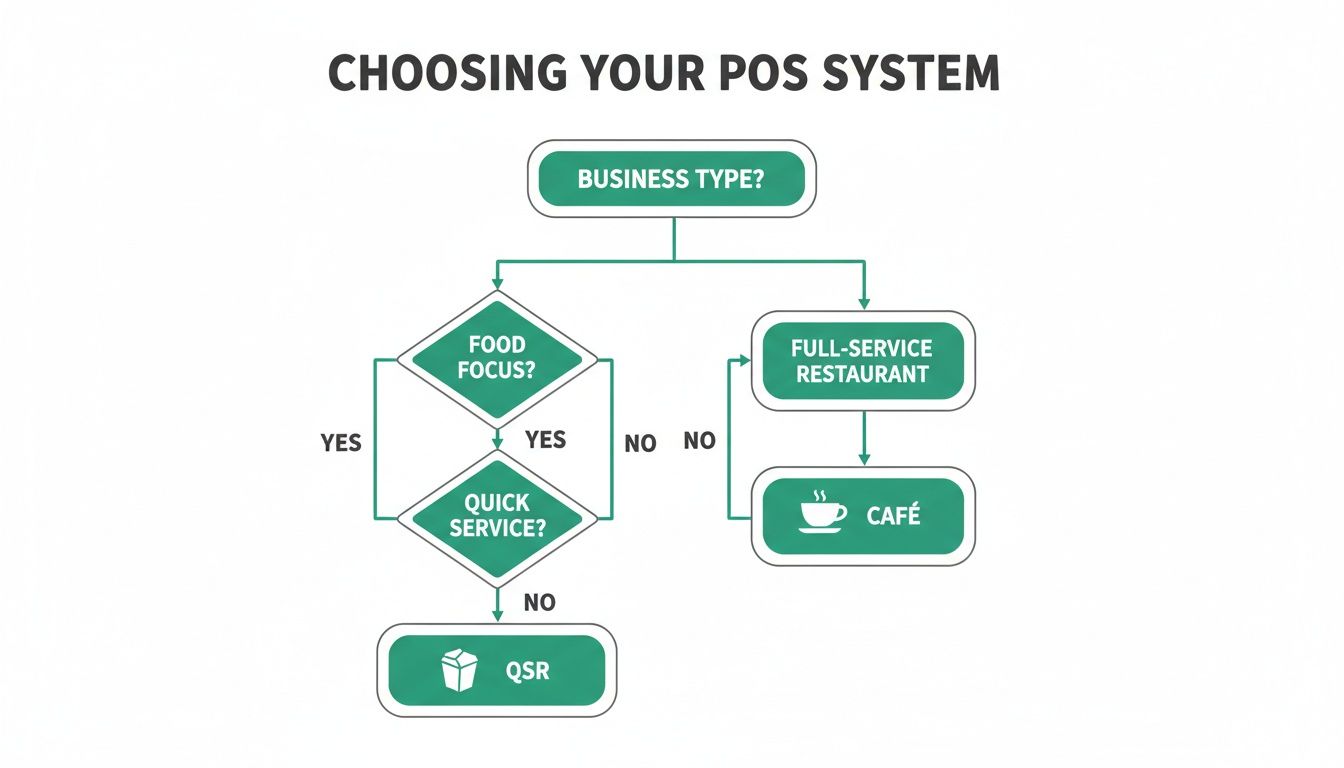
The main takeaway here is simple: whether you run a quick-service joint, a cozy café, or a full-service restaurant, the "best" advanced features are the ones that directly support your unique way of doing business.
Integrated CRM and Loyalty Tools
The real magic in this business is turning a first-time customer into a regular. Integrated Customer Relationship Management (CRM) and loyalty programs are your best tools for forging that connection. This goes way beyond old-school punch cards; a good system tracks visit history, order preferences, and total spend for every customer.
Armed with that data, you can create marketing that actually works. Think about automatically sending a "we miss you" coupon to a guest who hasn't been in for 60 days or rewarding your top 10% of customers with an exclusive offer. That's how you build a loyal following.
A POS with built-in CRM is an engine for repeat business. It helps you build a genuine community around your brand, not just a list of email addresses, and that drives the kind of predictable revenue you can build a future on.
Advanced Inventory and Online Ordering
As your business grows, keeping food costs in check becomes absolutely critical. Advanced inventory management isn't just about counting what's on the shelf; it's about recipe-level costing. This feature lets you see the precise profit margin on every single dish you sell, giving you the power to engineer your menu for maximum profitability. Some systems even generate purchase orders automatically when you're running low on key ingredients.
At the same time, you need to open up new ways to bring in money. A native online ordering integration is a must. When online ordering is built directly into your POS, orders flow straight to your kitchen display system just like any other ticket. No more clunky third-party tablets or manually punching in orders from a different app. To further improve the guest experience, many systems can also connect with tools like a restaurant paging system to streamline table turnover.
By combining tight inventory control with seamless online ordering, a modern POS gives you the tools to run a more profitable and scalable business.
How to Choose and Implement Your New POS System
When you get right down to it, picking the best pos system for a small restaurant is a balancing act. You're weighing four big things: the total cost, how easy it is to actually use, whether it can grow with you, and what kind of support you'll get when things go wrong.
The goal here is simple: find a system that fixes your current headaches without creating a whole new set of problems down the road.
Your staff's learning curve should be a top priority. A system with a clunky, confusing interface is a recipe for disaster—it'll slow down your service and frustrate your team. This is one area where TackOn Table really shines, with its all-in-one simplicity and easy setup that gets you up and running in minutes, not days.
A new POS is a serious investment. Don't just look at the monthly subscription fee. You have to consider the total cost of ownership, which includes hardware, payment processing, and any other hidden fees. Tools like our POS savings calculator can give you a much clearer picture of the long-term financial impact.
Because a good POS system is such a significant purchase, it's worth looking into financing restaurant equipment to help manage your cash flow. In the end, you want to partner with a company that understands your vision for growth and provides the affordable, flexible technology to help you get there.
Ready to see how simple and powerful your restaurant management can be? Book a demo or start your free trial to experience TackOn Table firsthand.
Frequently Asked Questions About Restaurant POS Systems
Picking the right POS system for your restaurant can feel overwhelming. It’s a big decision, so naturally, you’ve got questions. Here are the answers to the ones we hear most often from restaurant owners.
What’s the Single Most Important Feature for a Small Restaurant POS?
Hands down, the most critical feature is ease of use. If a system is clunky or complicated, it slows everything down. A simple, intuitive interface means less time training new staff, fewer mistakes when punching in orders, and faster service when you’re slammed.
After simplicity, you need reliable payment processing and reports that actually make sense. A system like TackOn Table is designed with a super clean interface, so your team can get the hang of it almost immediately, but you still get all the powerful tools you need to run the business.
What Should a Small Restaurant Budget for a POS System?
The costs really vary. You could be looking at a monthly software fee anywhere from $60 to $150, or you could be facing a huge upfront hardware bill that runs into the thousands. The key is to think about the total cost, not just the price tag you see first.
A word of caution: watch out for those "free" POS deals. They almost always lock you into steep payment processing rates that you can't negotiate, which ends up costing you a lot more over time. All-in-one systems with transparent pricing, like TackOn Table, give you a predictable monthly cost and let you choose your own hardware, which is a much better value in the long run.
Can We Just Use an iPad for Our Restaurant POS?
Yes, you absolutely can. For most small restaurants, it’s not just an option—it’s the best choice. Modern, cloud-based POS systems are built to run smoothly on iPads and other tablets. This saves you a ton of money on expensive, proprietary hardware and gives you incredible flexibility for things like tableside ordering.
Our Take: Using a system like TackOn Table on an iPad gives you a professional-grade setup without the professional-grade price tag. It's a smart way to avoid the costly and restrictive hardware that comes with systems from Toast or Clover, making it a great Toast vs Clover alternative.
What’s the Real Difference Between a Cloud-Based and a Traditional POS?
It all comes down to where your data lives. A traditional, "on-premise" POS keeps all your data on a local server—a computer physically sitting in your back office. This means you can only access that information when you're actually at the restaurant.
A cloud-based POS, on the other hand, stores your data securely online. This is a game-changer. It means you can manage your restaurant from literally anywhere you have an internet connection, whether you're updating the menu from home or checking sales reports on your phone. For almost any small restaurant today, a cloud-based system is the way to go. You get remote management, automatic backups, and updates happen without you lifting a finger.
Ready to see how a simple, powerful, and affordable POS can change how you run your restaurant? TackOn Table was built for small restaurants that need great features without the complexity.
Book a Demo Today