

A successful restaurant runs on data, and a physical count of your inventory is the only way to get the real story. It's the process of manually counting every single item you have—in the stockroom, the walk-in, the bar—and comparing that number to what your sales reports say you should have. Think of it less as a chore and more as a crucial health check for your business.
Why Accurate Inventory Counts Are Your Secret Weapon
Let’s be real, nobody gets excited about inventory day. But for any restaurant, cafe, or food truck, regular physical counts are the most powerful tool you have for protecting profits. This isn't just about ticking boxes; it's about uncovering the hidden story behind your day-to-day costs and plugging the invisible leaks that slowly drain your bank account.

Uncovering Hidden Profit Leaks
Every time you do a physical count, you're pitting reality against theory. Your POS system knows you sold 50 burgers, so it assumes you used exactly 50 buns and 25 pounds of ground beef. Simple enough, right?
But what if your physical count shows you're actually down 30 pounds of beef? That 5-pound difference—what we call variance—is pure profit vanishing into thin air. It could be happening for all sorts of reasons:
- Waste: Produce spoiling before it ever makes it to a plate.
- Over-portioning: A line cook with a heavy hand consistently using more than the recipe calls for.
- Theft: Product quietly walking out the back door.
- Receiving Errors: A vendor accidentally shorting you on a delivery.
Without a physical count, these problems fly completely under the radar, silently eating into your margins week after week.
In the restaurant world, physical inventory counts are one of the most powerful levers for protecting razor-thin margins. Industry data shows food costs typically swallow 28–32% of total revenue, so even tiny variances add up fast. For a restaurant doing $2 million in annual sales, an unnoticed 5% variance can mean $30,000 in lost product every year. You can dive deeper into these important restaurant industry statistics.
From Manual Chore to Strategic Advantage with Your Restaurant POS
This is exactly where a modern Restaurant POS like TackOn Table turns a tedious necessity into a real strategic advantage. Instead of wrestling with clunky spreadsheets, our all-in-one platform connects your physical stock checks directly to your sales data.
Imagine your team doing counts on a tablet using our mobile POS feature—no more clipboards or transcription errors. The system instantly crunches the numbers, highlighting the variance between your physical count and what you should have used based on sales. You get immediate, actionable insights.
This combination of simplicity, affordability, and adaptability makes TackOn Table a powerful yet approachable alternative to more complex systems like Toast or Clover. It gives you the data you need to run a smarter, more profitable restaurant without the headache.
How to Prepare for a Flawless Inventory Count
An accurate inventory count doesn't just happen; it starts with preparation. Jumping into a count without a solid plan is a fast track to mistakes, wasted time, and bad data that makes the whole effort useless. A little prep work upfront makes all the difference, ensuring your team can get in, get it done right, and get out with minimal chaos.
The absolute first step is getting organized. Before your team even thinks about counting, get your stockroom, walk-in, and dry storage areas in order. This is the perfect time to enforce the First-In, First-Out (FIFO) method—oldest stock to the front, newest to the back. It’s a simple move that makes counting a breeze and, more importantly, cuts down on spoilage.

Setting Your Team Up for Success
Once your shelves are tidy, it's time to get your crew ready. I always put together an "inventory kit" so nobody has to stop and hunt for supplies mid-count.
Think about what you'll need:
- Scales for weighing those half-empty bags of flour or opened bottles of olive oil.
- Calculators for on-the-fly math.
- Clipboards and pens if you're still using paper count sheets.
- Fully charged tablets or phones if you're using a modern system like TackOn Table's mobile POS.
And here's a detail you can't afford to overlook: standardize your units of measure. Does that case of tomatoes get counted as "1 case," "6 cans," or "168 ounces"? If different people use different units, your final numbers will be a complete mess. Make sure every single item is defined the same way in your system and on your count sheets. No guesswork allowed.
Pro Tip: Always use a "shelf-to-sheet" approach. This means your count sheets—whether paper or digital inside your Café Management Software—should match the physical layout of your storage areas. This lets your team move methodically down each aisle, from top to bottom and left to right, making it nearly impossible to skip something or double-count a section.
A Simple System for Better Accuracy
Want to build a safety net right into your process? Use a two-person team. One person is the counter, who calls out the items and quantities. The other is the recorder, who keys the numbers into the sheet or your POS system. The recorder isn't just a data entry clerk; they're a second set of eyes, confirming what the counter says and catching obvious mistakes before they happen.
This is where a system like TackOn Table really shines. When your recorder can punch counts directly into a tablet, you completely eliminate the risk of typos that inevitably happen when you transfer numbers from a messy clipboard to a spreadsheet later. This one change can make a huge difference in the accuracy of your physical inventory counts.
Ready to see how a simple, powerful POS can transform your inventory process? Start your free trial of TackOn Table to discover an easier way to manage your restaurant.
Choosing the Right Inventory Counting Method
Picking the right way to count your inventory is a lot like a chef choosing the right knife for a specific cut. There isn't one "best" way to do it; the best method depends entirely on what you're trying to accomplish. Your goal dictates how often you count, what you focus on, and ultimately, what you learn from the process.
The approach that works for a high-volume food truck will look very different from the needs of a multi-location fine-dining group. Getting a handle on the main methods—the classic wall-to-wall count, strategic cycle counting, and the accuracy-focused blind count—is the first real step toward building an inventory system that actually protects your profits.
The Comprehensive Wall-to-Wall Count
The full physical count, or "wall-to-wall" count, is the big one. It’s exactly what it sounds like: you and your team stop everything and count every single item in the building. From the sacks of potatoes in the back to the last lemon behind the bar, everything gets a number.
This method gives you a complete, undeniable snapshot of your inventory value at a specific moment. It’s absolutely essential for your big financial reports, like your end-of-month or end-of-year P&L statements. If you need a hard, definitive number for your accountant, this is the gold standard. But let's be honest—it's also a massive headache. It's disruptive, labor-intensive, and usually means shutting down early or paying staff for a late night of tedious work.
The Strategic Approach of Cycle Counting
For a more nimble and less disruptive approach, many operators are turning to cycle counting. Instead of one gigantic counting event, you break your inventory down into smaller, more logical groups. Then, you count those smaller groups on a rotating, much more frequent schedule.
This strategy lets you put your energy where it counts the most. For example, you might decide to count your expensive, high-theft items—like top-shelf liquor and prime steaks—every single week. Meanwhile, your low-cost staples like salt or flour might only get counted once a month. This approach keeps a steady stream of accurate data flowing without the all-hands-on-deck chaos of a full count.
- You'll spot issues like theft, waste, or over-portioning much, much faster.
- The work is spread out, so it feels less like a monumental chore for your team.
- You get more current data, which leads to smarter, more timely purchasing.
A flexible Restaurant POS like TackOn Table is built for this kind of modern inventory management. You can easily set up different count schedules for various product categories, all from one central dashboard.
Ensuring Objectivity with Blind Counts
Finally, we have the blind count. This isn't really a standalone method, but more of a technique you can apply to either a full or cycle count to boost its accuracy. Here’s how it works: the staff members doing the counting have no access to the "expected" quantities from your POS system.
When you take away the expected number, you remove what’s called confirmation bias. Your team is forced to count what they actually see in front of them, not what they think should be there. The result is a far more honest and reliable count.
After the blind count is done, a manager then compares those real-world numbers to what the system predicted. This is where you uncover the real variances. It’s a powerful way to build accountability and ensure your inventory data is as precise as it can be. For operators looking at Toast vs Clover alternatives, TackOn Table offers this level of control with a simplicity and affordability that's hard to beat.
To help you decide which method (or combination of methods) is right for you, let's break them down side-by-side.
Comparison of Inventory Counting Methods
This table lays out the core differences between the three main physical counting methods. Use it to figure out the best strategy for your restaurant based on your specific goals, staffing, and the kind of products you carry.
| Counting Method | Best For | Frequency | Pros | Cons |
|---|---|---|---|---|
| Full Physical Count | End-of-period financial reporting; getting a complete inventory valuation. | Monthly, quarterly, or annually. | Provides a definitive, comprehensive snapshot of all inventory at once. The gold standard for accounting. | Highly disruptive, labor-intensive, and prone to human error due to fatigue. |
| Cycle Counting | High-value or high-theft items; proactive loss prevention; daily operations. | Daily, weekly, or bi-weekly for specific categories. | Less disruptive, catches discrepancies quickly, improves purchasing accuracy, and keeps inventory data current. | Requires consistent scheduling and discipline; doesn't provide a single, complete valuation at one time. |
| Blind Count | Improving accuracy and accountability for any type of count. | Can be used during any full or cycle count. | Eliminates confirmation bias, leading to highly accurate and honest counts. Excellent for staff training. | Can take slightly longer as there's no reference point; requires a manager to reconcile the data afterward. |
Ultimately, many of the most successful restaurants use a hybrid approach—relying on cycle counts for day-to-day management and performing a full, blind count for their major financial check-ins.
Ready to find the perfect inventory method for your business? A system designed for flexibility makes all the difference. Book a demo and see how easy inventory management can be.
Tying Your Counts to Your Restaurant POS System
This is where the real magic happens. It’s the point where technology takes a tedious, manual chore and turns it into a powerful, data-driven process. Ditching the old clipboard and spreadsheet isn't just about saving time—it's about gaining a level of accuracy and control over your inventory that was impossible before. A modern POS system transforms a physical count from a simple tally into a serious business intelligence tool.
The entire industry is heading this way. As more restaurants move to cloud-based systems, physical counts are becoming quicker, more accurate checkpoints. In a market expected to hit USD 14.70 billion by 2030, these platforms use mobile devices and real-time reporting to give even small cafes the kind of perpetual inventory accuracy once reserved for huge chains.
From the Walk-In to Your Dashboard in Minutes
Picture this: your manager is in the walk-in, tablet in hand, tapping in counts directly on the TackOn Table app. There's no paper, no sloppy handwriting, and absolutely no chance of making a typo when transferring numbers to a spreadsheet later. The data syncs instantly, straight from the shelf to your system.
This mobile-first approach is at the heart of our platform. It was designed for the real world of a busy kitchen, making the whole process faster and way more accurate.
This handy decision tree can help you figure out which counting method is right for your specific goal.
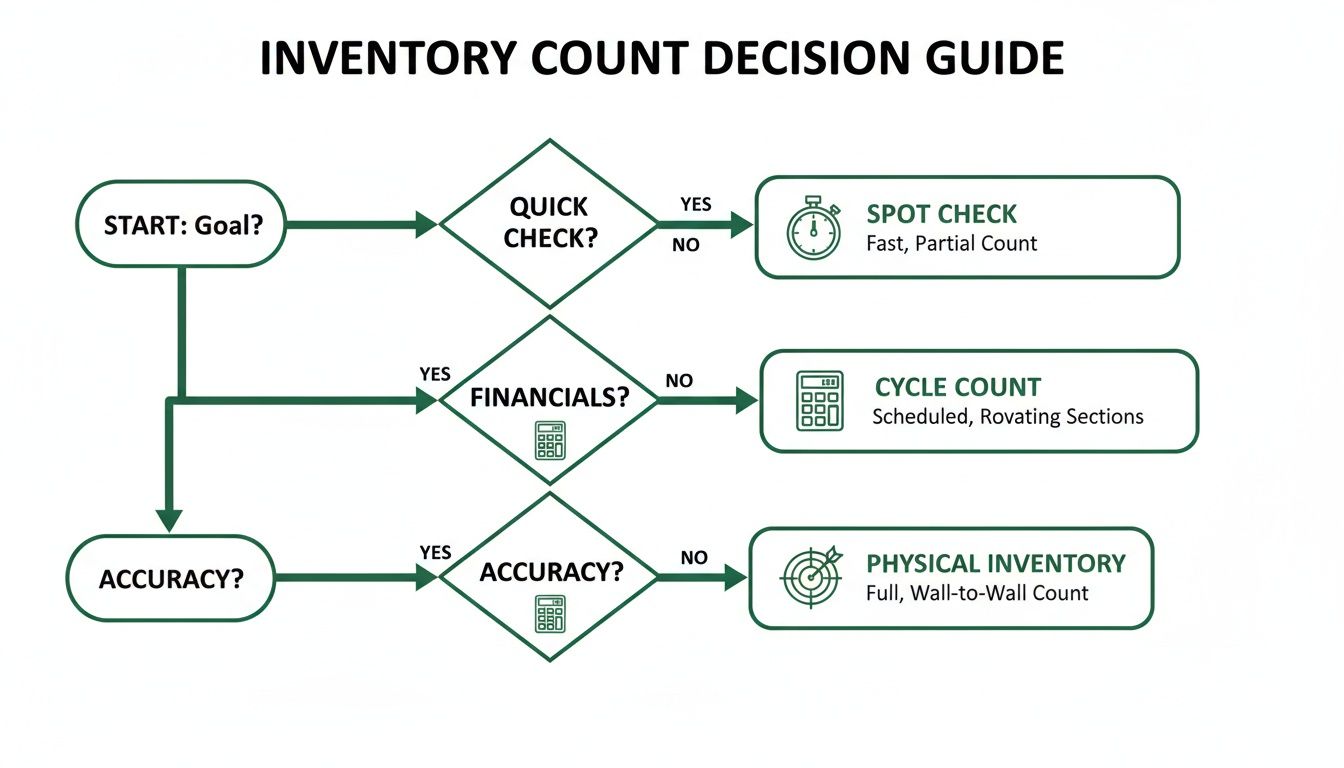
As you can see, whether you're doing a quick check, aiming for perfect financial accuracy, or digging into variances, a system-guided approach gets you better results.
Instantly Calculate and Analyze Variances
The best part of using an integrated system is what happens the moment you finish counting. TackOn Table automatically compares your physical count against what your sales data says you should have on hand. That difference, your variance, is calculated on the spot.
You no longer have to wait hours—or even days—to find out where the problems are. The variance report immediately flags the items with the biggest discrepancies, giving you clear insight into potential over-portioning, unrecorded waste, or even theft.
This immediate feedback is what makes the system so powerful. It shifts inventory from a reactive chore to a proactive management strategy, letting you fix issues before they start eating into your profits. To get the most out of this, it's worth learning how to optimize your business with a restaurant inventory management system.
Logging Adjustments for Clean Financials
Let's be real—discrepancies happen. A case of tomatoes shows up bruised, a server accidentally comps a dish, a line cook drops a steak. If you don't have a system for tracking these everyday events, your inventory numbers will never line up with your financial reports.
With TackOn Table, you can log adjustments for spoilage, waste, and comps right when they happen. This means that when you run your variance report, you’re only seeing the true, unexplained losses. This simple habit keeps your financial data clean and your cost of goods sold (COGS) accurate.
This all-in-one simplicity is where TackOn Table really shines as an alternative to competitors like Toast and Clover. We've combined easy setup, powerful multi-location control, and intuitive inventory tools into one affordable package. Our restaurant management solutions are designed to give you total control without the usual complexity.
Turning Inventory Data Into Smarter Business Decisions
You’ve finished the count, and the numbers are in the system. So, what now? The real value isn’t just knowing what’s on the shelf; it's about turning that raw data into action that boosts your bottom line. This is where your POS system stops being just a cash register and starts being a strategic partner.
An inventory variance report from a system like TackOn Table is far more than a simple list of what’s missing. Think of it as a roadmap pointing directly to hidden costs and operational weak spots. It’s how you finally spot those patterns of waste, potential theft, or sloppy portioning that have been quietly eating into your profits.
Decoding Your Variance Reports
Let's say you run the numbers and see your ground beef variance is way off—and it’s been that way for a few weeks running. That's not a coincidence; it's a bright red flag.
A recurring discrepancy like that could mean a few things. Maybe a line cook needs a quick refresher on portioning burgers. Or perhaps there's an issue with your receiving process, and you're getting shorted by your supplier. These insights allow you to tackle the root of the problem, not just the symptom. You can schedule targeted training, adjust a recipe, or have a pointed conversation with your purveyor. This is how you can implement smart strategies for reducing food waste that actually stick.
Think of your TackOn Table variance report as a diagnostic tool for your restaurant's financial health. A high variance is like a fever—it tells you something is wrong, and the pattern shows you exactly where to look for the cause.
From Historical Data to Smart Ordering
One of the most powerful things you can do with consistent inventory data is set intelligent par levels. Your par level is the absolute minimum amount of any item you need to have on hand to get you through to your next delivery. When your counts are consistently accurate, you can dive into your TackOn Table dashboard and use historical sales data to set these levels with total confidence.
This data-driven approach puts an end to the guesswork. No more tying up thousands of dollars in overstocked inventory just to be safe, and no more 86'ing your most popular dish in the middle of a Saturday night rush. You can even see how much you could save by optimizing your stock levels by using our handy restaurant savings calculator.
Your inventory turnover rate is another goldmine of information. TackOn Table makes it easy to spot those slow-moving items that are just collecting dust and tying up cash. Is that craft gin just not selling? Maybe it’s time to feature it in a cocktail special to move it. This is how a routine physical count of inventory connects directly to building a smarter, more profitable menu.
Ready to turn your inventory data into your biggest asset? Start your free trial of TackOn Table and see how simple it can be.
FAQ: Your Top Questions About Physical Inventory Counts
Even the most buttoned-up inventory plan can leave you with questions. Let's tackle some of the most common ones I hear from restaurant owners, with practical answers that show how a modern POS system can be your best tool for getting it right.
How Often Should We Be Doing a Full Physical Inventory Count?
There’s no single magic number here—it all comes down to the value and turnover of your items. For your high-cost, fast-moving products like prime cuts of beef or that popular top-shelf bourbon, you should absolutely be counting them weekly. Catching a discrepancy on a $50 bottle of whiskey after a week is an inconvenience; catching it after a month is a significant financial hit.
For general dry goods, canned products, and other less critical items, you can stretch that out to bi-weekly or even monthly. The key, though, is consistency. A system like TackOn Table helps by letting you create different cycle count schedules. This means you can keep a close eye on the expensive stuff without the headache of a full, wall-to-wall count every single week.
What Are the Biggest Mistakes People Make During Inventory Counts?
After years in this business, I can tell you the biggest errors almost always boil down to three things: inconsistent units of measure, a messy stockroom, and basic math blunders. If you count a "case" of wine one week and individual "bottles" the next, your data is useless.
To fix this, get ruthless about standardizing every single unit in your POS. Then, organize your storeroom so it mirrors your digital count sheets—no more hunting for things. Most importantly, ditch the clipboard and calculator. Using a mobile POS like TackOn Table for direct entry on a tablet or phone kills transcription errors on the spot and makes sure your numbers are right from the get-go.
A gap between your physical count and what your POS says isn't a failure. It's an insight. This variance is precisely what physical counts are meant to uncover, pointing you directly to issues like unrecorded waste, over-portioning, or receiving mistakes.
Why Does My Physical Count Never Match What the POS Says It Should Be?
Honestly, that’s the whole point of doing the count in the first place! Think of the variance report from TackOn Table as the beginning of an investigation, not the end. Your job is to look for patterns. Is the same steak always coming up short? Is a specific bartender always working when the vodka is off?
This is how you pinpoint the root cause of shrinkage and turn what looks like a loss into an opportunity to save money. For more answers to common questions, you can always check out our full TackOn Table FAQs page.
How Can a POS Help Me Manage Inventory for My Multi-Location Cafe?
This is where a cloud-based system really shines. TackOn Table's multi-location control gives you a bird's-eye view of your entire operation from a single dashboard. You can standardize inventory items and counting procedures across all your cafes, ensuring everyone is on the same page.
Better yet, you can compare variance reports and food costs between locations. This helps you instantly see which managers are crushing it and which teams might need a bit more training. It brings a level of consistency and control to your brand that used to require complex, expensive enterprise systems, which is a huge advantage we offer as a leading Toast vs Clover alternative.
Ready to stop dreading inventory day and start using it as a profit-driving tool? TackOn Table gives you the all-in-one simplicity and powerful features you need to take complete control of your stock.
Book a demo and see for yourself how our easy setup and mobile-first design can transform your restaurant's back-of-house operations.