

When you're running a small restaurant, the best POS system is one that strikes the right balance between affordability, powerful features, and all-in-one simplicity. For a café, food truck, or neighborhood bistro, you don't need the most complicated platform on the market. You need a tool that handles the daily grind—fast ordering, smooth payments, and straightforward management—without a steep learning curve or a budget-busting price tag.
What Makes a Restaurant POS Great for a Small Business?
Picking the right Point of Sale (POS) system is a huge decision for any small restaurant owner. Think of it as more than just a cash register; it's the operational hub connecting your front of house, kitchen, and back office. The right system helps you serve customers faster, manage your inventory and staff better, and gives you the data you need to make smart decisions for growth.
For small businesses, three things really matter: affordability, ease of use, and all-in-one functionality. You don’t have the luxury of time for complex training or the budget for pricey, custom hardware. You need something that works right away, that your staff can pick up quickly, and that brings all your essential tools together. If you're just getting started, guides on how to start a coffee shop always stress how vital it is to choose the right operational tools from the get-go, and the POS is always at the top of that list.
Different Ways to Think About POS Systems
As you start looking at different options, you'll notice two main schools of thought in restaurant tech. The old-school, legacy systems often lock you into long contracts and make you buy their specific, expensive hardware. On the other hand, modern systems are all about flexibility and simplicity.
Let's break down the practical differences:
| Aspect | Legacy Systems (e.g., Toast, Clover) | Modern Alternatives (e.g., TackOn Table) |
|---|---|---|
| Setup & Onboarding | Requires a professional installer and can take days to train your team. | Built for you to set it up yourself in under 30 minutes with an easy-to-follow guide. |
| Hardware | Forces you to buy their expensive, proprietary terminals and card readers. | Lets you use your own devices, like iPads, saving you thousands of dollars upfront. |
| Contracts & Pricing | Often locks you into multi-year contracts with complicated fee structures. | Offers clear, month-to-month plans with no long-term commitment. |
| Core Functionality | Basic plans often require you to pay extra for essential tools like online ordering. | Includes everything you need—like online ordering and multi-location control—in one unified platform from the start. |
The biggest differentiator for a small restaurant is adaptability. A system like TackOn Table that lets you bring your own hardware and doesn't tie you down with a long-term contract frees up your cash to invest in what really matters: your food, your people, and your customer's experience.
This modern approach is exactly what TackOn Table was built for. It’s a complete café management software that runs on the devices you probably already have. It includes features like a mobile POS for taking orders at the table, a super easy setup process, and the ability to manage multiple locations from one dashboard. It gives small restaurants the power they need to compete without the complexity. Ultimately, you're looking for a partner in your business, not just a payment processor.
Ready to see how a simple yet powerful POS can change your day-to-day operations? Start a Free Trial of TackOn Table Today!
Key Features of the Best Restaurant POS Software
Finding the right POS system for your small restaurant isn't just about taking payments anymore. Think of it as the command center for your entire operation—the tool that drives efficiency, boosts profits, and helps you grow. It’s about arming your business with the right tech to master the daily chaos and make smarter decisions for the long haul.
At its core, any great restaurant POS has to nail order and table management. For a bustling cafe or a slammed food truck, every single second matters. A clean, intuitive interface lets your staff fly through complex orders with pinpoint accuracy, firing them straight to the kitchen display system (KDS). This simple, direct line of communication is proven to cut down order mistakes by a staggering 95%, making sure happy customers get exactly what they ordered.
Better yet, a mobile POS like TackOn Table completely frees your staff from being stuck behind a counter. When servers can take orders and payments right at the table, service speeds up by as much as 40%. This doesn't just turn tables faster; it creates a smoother, more personal experience for your guests.
Real-Time Inventory and Menu Control
Poor inventory management is one of the quickest ways for a small restaurant to bleed money. Running out of your best-selling dish during the dinner rush? It's a total nightmare that leads to lost sales and let-down customers. A modern POS with real-time inventory tracking stops this problem before it even starts.
The system should automatically subtract ingredients from your stock as soon as an order is punched in. This gives you a live, up-to-the-minute look at what's on your shelves, so you can reorder supplies before you’re in a bind. It also lets you:
- Get low-stock alerts for your most important ingredients.
- Spot which items aren't selling so you can free up that cash.
- Instantly 86 a dish from the menu on every device with a single tap.
This isn't just a feature; it's a game-changer. You go from guessing your stock levels and doing tedious manual counts every night to having precise, actionable data at your fingertips. It’s what separates a basic cash register from a true restaurant management tool.
Flexible Payments and Staff Management
These days, customers expect to pay however they want, whether that's with a credit card, a mobile wallet like Apple Pay, or a quick contactless tap. Your POS has to handle all major payment types securely and without a hitch. This flexibility isn't just about meeting expectations—it also makes the checkout process way faster, which is a lifesaver in high-volume spots.
Managing your team is another piece of the puzzle. The right POS will have built-in staff management tools that let you handle everything in one place:
- Build and manage employee schedules with ease.
- Set user roles and permissions to control who can access sensitive functions like comps or voids.
- Track individual performance by looking at sales data for each server.
This integration simplifies your day-to-day, cuts down on the risk of employee theft, and gives you clear insights into who your rockstars are. Quick-service restaurants (QSRs) are a huge part of this market, making up 36.9% of the global $25.1 billion POS industry, and they absolutely depend on this kind of operational speed. It also explains the high demand for durable, spill-proof hardware in these fast-paced kitchens. You can read the full research about the restaurant POS market here.
For small restaurant owners who need a powerful system that’s actually easy to use, TackOn Table's all-in-one platform delivers these crucial features without the headache. The straightforward setup gets you up and running fast, so you can manage everything from orders to inventory from a single, intuitive dashboard. This unified approach makes sure every part of your business is working together, giving you the solid foundation you need to succeed.
Ready to see how these features can make a real difference in your restaurant? Book a Demo with TackOn Table and discover a smarter way to run your business.
Toast vs. Clover Alternatives: Why Small Restaurants Need a Different Solution
When you start shopping for a POS system, you'll hear the names Toast and Clover almost immediately. They're giants in the industry, but their one-size-fits-all model often feels designed for massive chains, not independent restaurants. For a small café, food truck, or neighborhood bistro, the steep costs, mandatory proprietary hardware, and rigid long-term contracts can feel more like a burden than a benefit.
That's why a lot of smart restaurant owners are looking for alternatives that put flexibility, transparent pricing, and all-in-one simplicity first. This isn't just about finding something cheaper; it’s about finding a system that actually works with your business, not one that forces you into a box.
The industry is definitely moving in this direction. In 2025, an eye-opening 52% of restaurants globally are planning to invest in new or upgraded POS technology. Among smaller spots, 55% are prioritizing these upgrades to speed up service and finally connect their in-person and online operations. If you're curious about the data behind this shift, you can read the full research on restaurant POS system statistics.
Onboarding and Usability: A Tale of Two Setups
One of the first places you'll feel the difference is during setup. With a system like Toast, getting started can be a week-long production involving professional installers and mandatory training sessions. It’s disruptive and expensive before you’ve even made your first sale.
We designed TackOn Table to be the complete opposite. Getting started shouldn't be a project.
- TackOn Table: Our platform is built for a 30-minute easy setup you can do yourself. The whole system is so intuitive that your team will pick it up in minutes, not days. You can get back to serving customers right away.
- Legacy Systems: Often require you to schedule technicians, deal with complicated hardware setups, and pull your staff off the floor for lengthy, mandatory training.
The philosophy is just fundamentally different. We empower you to take control from day one. Older systems often create a dependency on their support teams for even the simplest tasks. For a small business where every minute counts, a fast, painless setup is a huge advantage.
Pricing Transparency: The Hidden Costs of Old Tech
This is where many small restaurant owners get burned by traditional POS providers. Toast and Clover are notorious for their confusing pricing models, which often include hidden fees, iron-clad contracts with massive cancellation penalties, and locked-in payment processing rates that aren’t always competitive.
TackOn Table is built on clarity and trust. Our pricing is completely straightforward, with simple, contract-free plans that let you decide what’s best for your budget. You’ll never see a surprise fee on your bill, and you're free to leave at any time. This approach keeps us honest and ensures we have to earn your business every single month.
For a more detailed look, you can explore our comparison of TackOn Table vs Toast.
The essential features a POS needs to handle—the very things you see below—should be part of the core package, not expensive add-ons.
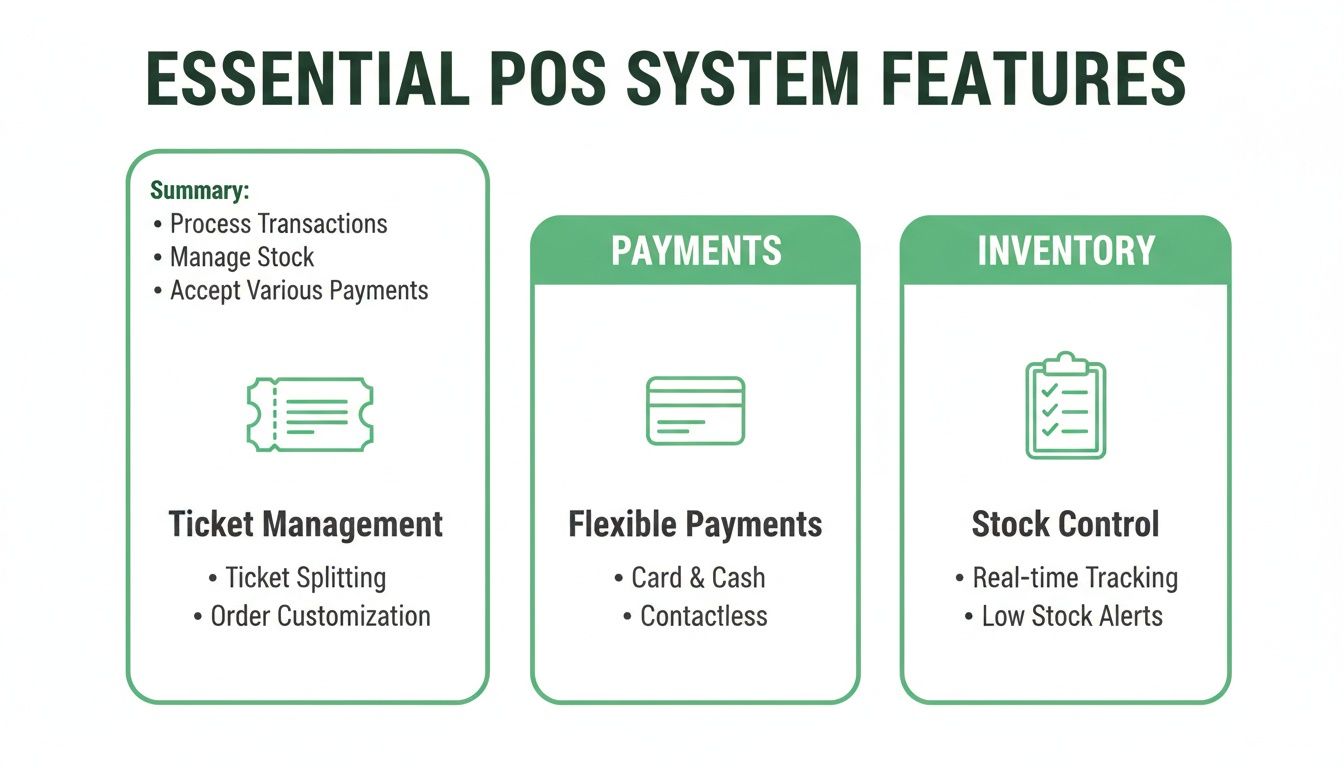
As you can see, the core functions of taking orders, processing payments, and managing inventory are the lifeblood of your operation. Your POS should bring them all together without making your budget more complicated.
To give you a clearer picture, here's a side-by-side look at how we stack up against the competition on the points that matter most to small restaurants.
POS System Comparison: TackOn Table vs. Competitors
| Feature | TackOn Table | Toast | Clover |
|---|---|---|---|
| Setup Time | Self-setup in 30 minutes | Professional installation required (days) | Professional or guided setup (hours to days) |
| Hardware | Use your own iPads/tablets | Proprietary hardware required | Proprietary hardware required |
| Contracts | No long-term contracts (month-to-month) | 2-3 year contracts with early termination fees | 2-3 year contracts common with resellers |
| Pricing Model | Transparent and predictable | Complex tiers with potential hidden fees | Varies widely by reseller; can be complex |
| Core Features | All-in-one platform (online ordering & multi-location included) | Core POS with add-on modules for key features | Core POS with features sold via an app market |
This table highlights a core difference in approach. While Toast and Clover lock you into their ecosystem, TackOn Table is designed to give you freedom, affordability, and control over your business.
Hardware Freedom and All-in-One Simplicity
Another major friction point is hardware. Toast and Clover force you to buy their expensive, proprietary terminals. If something breaks, you have no choice but to buy a replacement directly from them, usually at a premium. This hardware lock-in eliminates your choices and can easily add thousands of dollars to your startup costs.
TackOn Table gives you complete hardware freedom. Our café management software runs perfectly on standard iPads and other tablets—devices you might already have. This saves you a ton of money upfront and lets you build a setup that actually fits your counter space and workflow. Our mobile POS capabilities also mean you can take orders and payments anywhere, whether it's tableside, on the patio, or at a weekend market, all from a device you already know how to use.
Beyond that, we provide an all-in-one platform where essential tools like online ordering and multi-location control are built right in, not sold as separate, pricey modules. This integrated approach means every part of your operation works together seamlessly from a single dashboard, giving you a clear, real-time picture of your business without forcing you to juggle a dozen different apps and subscriptions.
Ready to see how a flexible and transparent POS can make a real difference for your restaurant?
Book a Personalized Demo of TackOn Table Today
How to Choose the Right POS for Your Restaurant Type
Let's be clear: there's no such thing as a one-size-fits-all POS system. The best POS for a small restaurant is one that fits its specific rhythm, whether that’s the frantic pace of a food truck or the laid-back vibe of a neighborhood café. The key is to pinpoint your biggest operational headaches and find a tool built to solve them.
To do this well, you first need a solid grasp of choosing the right types of POS systems and what makes them tick for different business models. This knowledge lets you look past flashy, generic features and zero in on what will actually improve your daily workflow, make your staff's life easier, and boost your bottom line. Every restaurant is different, and your POS should feel like it was made just for you.
POS Systems for Quick Service Restaurants (QSRs)
In the quick-service world, speed is everything. For QSRs, fast-casual spots, and bakeries, the main goal is throughput—moving as many customers through the line as quickly and accurately as possible. Every second you can trim from the ordering and payment process goes straight to your revenue and keeps customers coming back.
A POS built for speed needs an incredibly simple interface that lets cashiers punch in orders almost instinctively. Key features to look for are:
- Rapid Order Entry: Easy-to-find custom modifiers and combo builders.
- Integrated KDS: Orders fire directly to a Kitchen Display System, cutting out verbal errors.
- Fast Payments: Flawless support for tap-to-pay and mobile wallets.
TackOn Table shines in this environment with a clean, logical layout that makes training new staff a breeze. The system is highly responsive, so there’s zero lag between taking an order and it appearing in the kitchen, keeping your line moving even during the craziest lunch rush.
Café Management Software for Coffee Shops and Bistros
For full-service cafés and local bistros, the focus shifts from pure speed to a delicate balance of efficiency and customer experience. Yes, service needs to be prompt, but building relationships and creating regulars is what truly drives the business. Your POS has to support a more personal, nuanced style of service.
This is where features like loyalty programs and smart table management become invaluable. A system that can remember a customer’s usual coffee order or split a check without any fuss makes a huge difference. For a closer look, explore our guide on finding the perfect café management software.
For a café, the POS is a central part of the customer relationship. It should not only process transactions but also help you recognize your regulars, manage loyalty points, and make menu changes on the fly to feature daily specials.
With TackOn Table's mobile POS, your team can take orders right at the table. This simple change makes interactions feel more personal and actually speeds up the whole service cycle. Plus, its built-in customer relationship tools let you run a loyalty program without having to juggle a separate, clunky app.
The Ideal POS for Food Trucks and Mobile Vendors
Food trucks operate in a world of their own, with challenges that brick-and-mortar restaurants never face. The biggest hurdles are spotty internet, tight spaces, and the absolute need for mobility. A big, clunky, traditional POS terminal just won't cut it.
The perfect food truck POS has to be lightweight, tough, and—most importantly—have a rock-solid offline mode. This is non-negotiable. It means you can keep swiping credit cards even when you're in a cellular dead zone at a festival. Once you're back online, the system should automatically sync all the sales data.
TackOn Table was practically built for this. It runs on a standard tablet, giving you a powerful mobile POS that barely takes up any counter space. Its reliable offline mode gives you the confidence to do business anywhere, ensuring you never miss a sale. For operators with more than one truck, the multi-location control dashboard is a game-changer, letting you track sales and inventory across your whole fleet from one device.
Ready to find a POS that feels like it was built for your specific needs?
Start a Free Trial of TackOn Table
A Practical Guide to Implementing Your New POS System
Switching to a new POS system should feel like a genuine upgrade, not a logistical nightmare. The key to a smooth transition is a solid plan that covers moving your data, setting up the hardware, and getting your team comfortable with the new tools. A well-planned launch means your restaurant doesn't miss a beat.
First things first: you need to get your essential information loaded into the new system. This means migrating your entire menu—complete with every modifier and price point—and importing customer data for things like loyalty programs. An overly complicated system can turn this into a slow, painful process, but a modern platform should make it straightforward.
Setting Up Hardware and Training Your Team
With your data in place, it’s time to set up the physical hardware. This is where your choice of POS really shows its colors. Fixed POS terminals are still the workhorse for most small restaurants, making up 61.3% of the global $25.1 billion market. Their reliability in busy environments and easy connection to kitchen displays are hard to beat. It's no wonder that 44% of owners put hardware upgrades at the top of their list, looking for compact, secure units to keep service running smoothly. You can discover more insights about restaurant hardware trends on futuremarketinsights.com.
When you work with a partner like TackOn Table, you sidestep the headaches of proprietary systems. Instead of waiting around for an installer, our signature 30-minute easy setup lets you get your own devices—like iPads and card readers—online and ready to go in practically no time.
After the hardware is connected, you get to the most important part of the equation: your team. Great training is what makes or breaks a new system rollout. Your staff has to feel confident taking orders, running payments, and using all the new features from the moment you go live.
A well-designed POS should be so intuitive that a new hire can pick it up in minutes. We include complimentary onboarding support to walk your team through every function, making sure everyone is comfortable and prepared. This kind of hands-on help takes the stress out of adopting new tech.
Launching With a Dedicated Support Partner
The final step is the launch itself. With a lot of providers, this is where their support drops off, and you're left to figure things out alone. That self-service model is a huge risk, especially when something goes wrong during a dinner rush.
“Choosing a POS provider is about more than just software; it's about choosing a partner. Having unlimited, 24/7 support means you’re never alone. When you can get a real person on the phone in the middle of a dinner rush, that’s not a feature—it’s peace of mind.”
Our approach at TackOn Table is completely different. We see ourselves as a true partner to your business, which is why we provide unlimited 24/7 support. From day one, you have a dedicated team ready to answer any question and make sure your launch—and every day after—is a success.
Ready to see how a seamless transition with a team that has your back feels? Book a Demo with TackOn Table and we'll show you how easy it can be.
Making Your Final Decision with Confidence
Picking the right POS system is a huge moment for your restaurant. The right one acts like a trusted business partner, helping you grow. The wrong one? It’s a source of constant headaches and daily friction. To help you nail this decision, I've put together a final evaluation checklist.
This isn't about marketing fluff. It’s a practical tool designed to help you ask the tough, direct questions every vendor should be able to answer. It focuses on the four things that really matter to an independent owner: core features, pricing, hardware, and support. Use it to cut through the sales pitch and see what will actually impact your day-to-day operations and your bottom line.
Your Essential POS Evaluation Checklist
Before you sign on the dotted line with anyone, run them through these checkpoints. The answers you get will tell you everything you need to know about who’s truly ready to support your small restaurant's success.
Core Functionality
- Is it actually an all-in-one system? Ask them point-blank: are core tools like online ordering and inventory management included from the start, or are they expensive add-ons I'll have to pay for later?
- Does it fit how I serve customers? You need a system built for your specific style. Can it keep up with the fast pace of a quick-service spot, manage the complex modifiers of a café, or offer the on-the-go flexibility a food truck demands?
- How painful is the setup? Can I genuinely get this thing up and running myself in about an hour, or am I looking at a complicated installation that takes my restaurant offline for days?
Pricing and Contracts
- Is the pricing truly transparent? Push for a simple, clear breakdown of every single monthly fee. No hidden charges allowed. To see what this looks like, you can review our transparent pricing plans.
- Am I going to be trapped in a long-term contract? Do you offer a flexible month-to-month agreement, or am I being pushed into a multi-year commitment with hefty penalties if I need to leave?
- Are the payment processing rates competitive and clear? Demand full visibility into the transaction fees. Bundled rates can often hide higher costs.
Hardware and Support
- Do I have hardware freedom? Can I save a ton of money upfront by using my own iPads and tablets, or are you forcing me to buy your expensive, proprietary hardware?
- What does "support" really mean? When things go wrong at 8 PM on a Saturday, what happens? Is there a real, 24/7 support team that understands restaurants, or am I stuck with email tickets and a library of DIY articles?
Choosing a POS system isn't just about buying software; it's an investment in the very backbone of your restaurant. A real partner gives you clear pricing, the freedom to choose your own hardware, and support you can actually count on. That’s what gives you the confidence to adapt and thrive.
We built TackOn Table to check every single one of these boxes. Our platform is a true all-in-one, our pricing is clear and contract-free, and we're committed to letting you use your own hardware. We believe the best POS for a small restaurant is one that empowers you, not one that locks you down.
See how a true partner can simplify your operations and help you grow.
Start Your Free Trial of TackOn Table Today
Frequently Asked Questions about Restaurant POS Systems
Let's tackle some of the most common questions that pop up when you're trying to find the right POS system for your restaurant. Getting these answers straight is a huge step toward making a confident choice.
How much should a small restaurant expect to pay for a POS system?
The price tag can be all over the map. The key is to avoid getting locked into massive upfront hardware costs or rigid, long-term contracts. The best fit for a small spot is usually a system with clear, scalable monthly pricing.
This approach lets your POS grow with you, not hold you back. Before you sign anything, demand a full cost breakdown. You need to see the payment processing rates, any hardware costs, and what they'll charge for support down the line. A system like TackOn Table lays out its pricing in simple tiers, so you're only paying for the features you're actually using, highlighting affordability and simplicity.
Can I use my own iPad or tablet with the POS?
This is a big one, and it really depends on the provider. Some of the older, legacy systems—think Toast—force you into buying their expensive, proprietary hardware. That can easily add thousands of dollars to your startup costs before you’ve even served your first customer.
On the other hand, more modern and flexible systems like TackOn Table are built to work on the hardware you might already have, like an iPad. This freedom doesn't just save you a significant amount of money upfront; it gives you total control over how you set up your space. Always, always double-check device compatibility before you commit.
Choosing a POS that works with your own hardware is one of the smartest ways to keep initial costs down. You get instant savings and the flexibility to create a setup that makes sense for your unique workflow.
How secure are cloud-based POS systems?
It's a fair question, and the answer is: very secure. Modern cloud-based POS systems deliver top-tier security, often far better than what you could manage with an old-school, on-site server. Reputable providers are PCI compliant, which is the gold standard for protecting customer credit card data, and they use end-to-end encryption on every single transaction.
One of the unsung benefits of the cloud is automatic data backup. If your hardware fails, gets damaged, or is stolen, all your critical business information is safe and sound off-site. You can get back up and running without missing a beat.
Ready to see how TackOn Table can simplify your operations with a secure, flexible, and affordable POS system?
Book a Demo Today!